


So the straightforward answer is no, you do not always need Marketing Cloud Next to send SMS from Salesforce. If your focus extends beyond marketing interactions and campaign orchestration, a Salesforce-native AppExchange SMS app like 360 SMS is a perfect choice. It works on any edition (Sales Cloud, Service Cloud, or core Salesforce) with or without Marketing Cloud.
That’s the short answer. But since teams have spent real money getting this wrong, the specifics are worth walking through.
Send SMS from Salesforce Without Marketing Cloud
Salesforce does not include SMS out of the box in any edition. But you do not need Marketing Cloud Next to add it. Native AppExchange apps like 360 SMS install directly into your existing Salesforce org in under 20 minutes.
The reason this question keeps coming up is historical. For years, Marketing Cloud was the Salesforce answer for any messaging at scale. The enterprise recommendation, almost reflexively, was Marketing Cloud. That answer stuck — even as a full category of native AppExchange SMS apps was built specifically for Sales Cloud and Service Cloud teams.
In practice, those apps run entirely inside the Salesforce org your team already uses. No external platform. No data sync. No separate login your reps have to remember. Records, opt-outs, and conversation history live on the Salesforce record itself, where they should.
So What Does Marketing Cloud Next Actually Do for SMS?
Worth saying: Marketing Cloud Next does support SMS. Calling it incapable would be inaccurate, and teams that made blanket statements about Salesforce messaging limitations were already on thin ice before MCN launched. But what the product actually does, and what it costs, tells a different story.
Marketing Cloud Next supports SMS as an add-on at $2 per 1,000 sends. Two-way SMS conversations are only available in the Advanced edition, which costs $3,250 per organization per month, billed annually.
That’s $39,000 per year before a single send credit. And Data Cloud is mandatory for MCN messaging — not optional, not an upsell. You can’t activate MCN’s SMS without provisioning Data Cloud alongside it.
That’s the thing. MCN’s SMS is built for marketing campaign automation. Journey-triggered messages. AI-assisted send-time optimization. Cross-channel analytics connecting email, SMS, and push in one place. Genuine capabilities, useful for teams running large-scale campaign orchestration.
But none of that is what a sales rep needs when they want to text a prospect from a Lead record. A recruiter sending a candidate an interview update. A service agent confirming a repair window. These are 1:1 operational conversations — a completely different use case from campaign messaging, and not what MCN was designed around.
MCN SMS makes sense when a team is already on MCN Advanced and wants SMS living inside the same campaign platform. That’s a legitimate scenario. Buying MCN to enable texting, when the actual goal is CRM-level rep communication? That’s buying a full marketing platform to solve a messaging problem.


3 Ways to Text from Salesforce Without Marketing Cloud
There are three ways to add SMS to Salesforce without Marketing Cloud Next: Salesforce Digital Engagement (Service Cloud add-on), a custom API integration, or a native AppExchange SMS app.
- Salesforce Digital Engagement
The native Service Cloud add-on for inbound messaging. Capped at 1,000 outbound SMS per license. Works for low-volume service follow-ups. Hits its ceiling fast on any real volume. - Custom API Integration (Twilio, Vonage, and others)
Full flexibility, developer-managed. Your team builds the connection, handles credentials, and maintains the integration. The tradeoff is ongoing engineering overhead and no out-of-the-box UI for reps. - Native AppExchange SMS App (360 SMS)
100% built on Salesforce. Installs from AppExchange in under 20 minutes, runs on any Salesforce edition, and doesn’t touch Data Cloud or Marketing Cloud. Covers 1:1 SMS, bulk SMS, two-way conversations, WhatsApp, MMS, Facebook Messenger, Instagram DM, WeChat, LINE, Viber, Kakao, Zalo — 15+ channels in one native Salesforce SMS app. No external login. No middleware. Everything stays in the org.
To be fair, all three options work. Most Sales Cloud and Service Cloud teams stop looking after option 3.
MCN SMS vs 360 SMS: Side-by-Side for Teams Who Just Want to Text
For Salesforce teams on Sales Cloud or Service Cloud who need two-way SMS and WhatsApp, a native AppExchange app is faster to deploy, cheaper to run, and does not require Marketing Cloud Next or Data Cloud.
Here’s how the two options compare directly:
| Marketing Cloud Next | 360 SMS App | |
| License required | MC Next Advanced ($3,250/org/month) | 360 SMS only |
| SMS included in license? | No — add-on at $2/1,000 sends | Included in plan |
| Data Cloud required? | Yes, mandatory | No |
| Two-way conversations | Advanced edition only | All editions |
| Works on Sales Cloud? | No | Yes |
| Works on Service Cloud? | No | Yes |
| Setup time | Weeks | ~20 minutes |
| Channel coverage | SMS, WhatsApp, RCS | SMS, WhatsApp, MMS, Facebook, Instagram, WeChat, LINE, Viber, Kakao, Zalo + more |
| Rep-level 1:1 texting from records | Not designed for this | Yes |
For enterprise teams already on MCN Advanced running cross-channel campaigns, SMS as a component of that platform makes sense. For a Sales Cloud team where reps want to reach prospects by text, the numbers above speak for themselves.
Who Should Use Marketing Cloud Next for SMS?
Marketing Cloud Next SMS makes sense for teams already using MCN Advanced for campaign orchestration who want SMS and WhatsApp inside the same journey platform.
Real reasons to use MCN for SMS: journeys blending email, SMS, and push in one platform; unified campaign analytics across channels; Agentforce-powered agents running inside an existing MCN setup. These are legitimate use cases.
Not real reasons: wanting SMS to be cheaper (it isn’t), wanting a simple setup (it isn’t), or enabling Sales Cloud and Service Cloud reps to text customers from records. For that last scenario, a native AppExchange SMS app is the direct answer — no $39K/year platform standing in between.
To be fair, MCN does a lot. It’s a serious marketing platform for teams that need what it does. The issue isn’t what it can do. The issue is that it’s the wrong tool for teams whose primary need is operational, 1:1 messaging from CRM records.
How to Set Up SMS from Salesforce Without Marketing Cloud
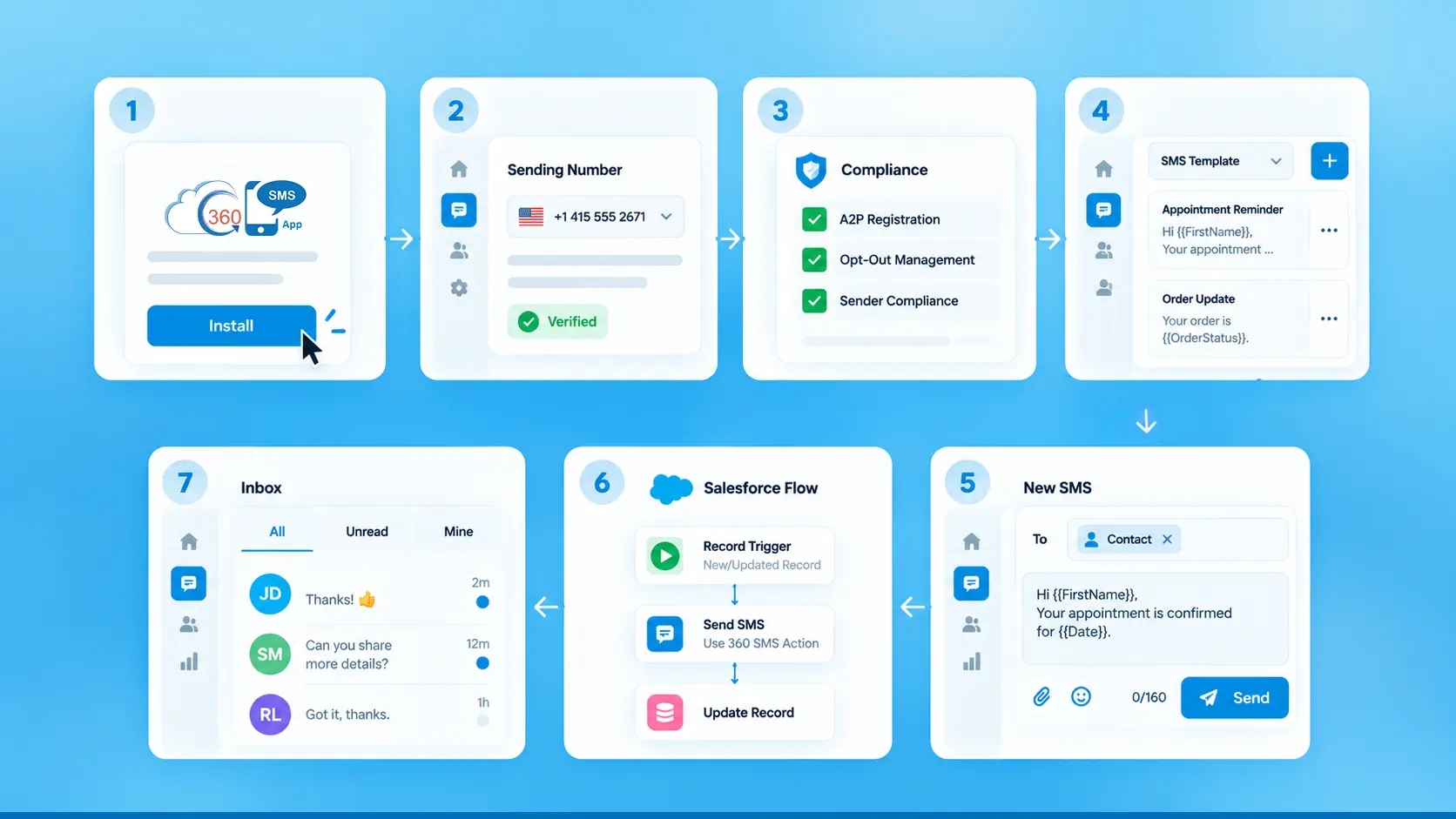

The 360 SMS setup, step by step:
Step 1: Install 360 SMS from Salesforce AppExchange
Search “360 SMS App” on AppExchange. Install directly into your org. No separate account creation, no platform migration, no sandbox complications.
Step 2: Configure a sending number
Long code for 1:1 conversational texting. Short code for high-volume bulk campaigns. Toll-free for a middle ground. Configuration happens inside Salesforce.
Step 3: Set up compliance keywords
Configure STOP, HELP, and any required TCPA compliance keywords. 360 SMS manages opt-in and opt-out automatically — consent gets written back to the Salesforce record, where it stays.
Step 4: Build message templates with merge fields
Pull Contact name, Opportunity stage, Case number, or any other CRM field directly into templates. No custom code, no field mapping outside Salesforce.
Step 5: Send your first 1:1 SMS from a record
Open a Lead or Contact record. The 360 SMS panel sits embedded in the layout. Pick a template or type a message. Send.
Step 6: Automate via Salesforce Flow
Trigger automated texts on record events — Lead Created, Case Escalated, Opportunity Stage Changed. The 360 SMS Flow actions plug directly into Salesforce Flow with no API credentials to manage.
Step 7: Monitor replies in the 360 SMS Inbox
All incoming replies land in the unified 360 SMS Inbox inside Salesforce. Conversations stay attached to the record. Reps handle two-way SMS, WhatsApp, and other channels without leaving the platform.
Final Thoughts
Marketing Cloud Next is a real platform doing real things for teams running integrated campaign marketing at scale. But SMS in MCN is a paid add-on inside a much larger, more expensive product — not a standalone messaging tool, and not the right answer for most Sales Cloud or Service Cloud teams.
In practice, the native AppExchange route gets you there faster, at a fraction of the cost, without the Data Cloud requirement. Reps can text from records on day one. Automation runs through Salesforce Flow without custom development. Fifteen-plus channels — including ones MCN doesn’t cover at all, like Facebook Messenger, Instagram DM, WeChat, and Zalo — are available through a single native Salesforce SMS app.
Worth saying: if SMS and WhatsApp inside Salesforce is the goal, and not a full marketing platform investment, the 360 SMS App covers it. AppExchange install, number configuration, first send in under 20 minutes. The comparison table above shows what $3,250 per month buys in MCN versus what a native Salesforce messaging app gives you out of the box.
Ready to simplify Salesforce messaging without a full marketing platform?