 Picture a sales rep following up on a lead that went quiet two days back. They pull up WhatsApp inside Zoho, type something out, hit send — and nothing. No error. No failed delivery notification. The contact’s reachable, the number’s right. Still won’t go through.
That’s the 24-hour window rule. First time it bites you, it’s baffling.
Once 24 hours pass since a customer last messaged you, that session closes — no reopening it with a free-form text. What you need is a pre-approved template, something Meta’s already vetted before it touches anyone’s inbox. So for any outbound follow-up or re-engagement from Zoho CRM, templates aren’t a nice-to-have. They’re the only door open.
Table of Contents
What Are WhatsApp Message Templates?
Scripts. That’s what people assume they’re getting. Fixed, word-for-word blocks you copy-paste and fire off. They’re not, and walking in with that assumption causes real friction early.
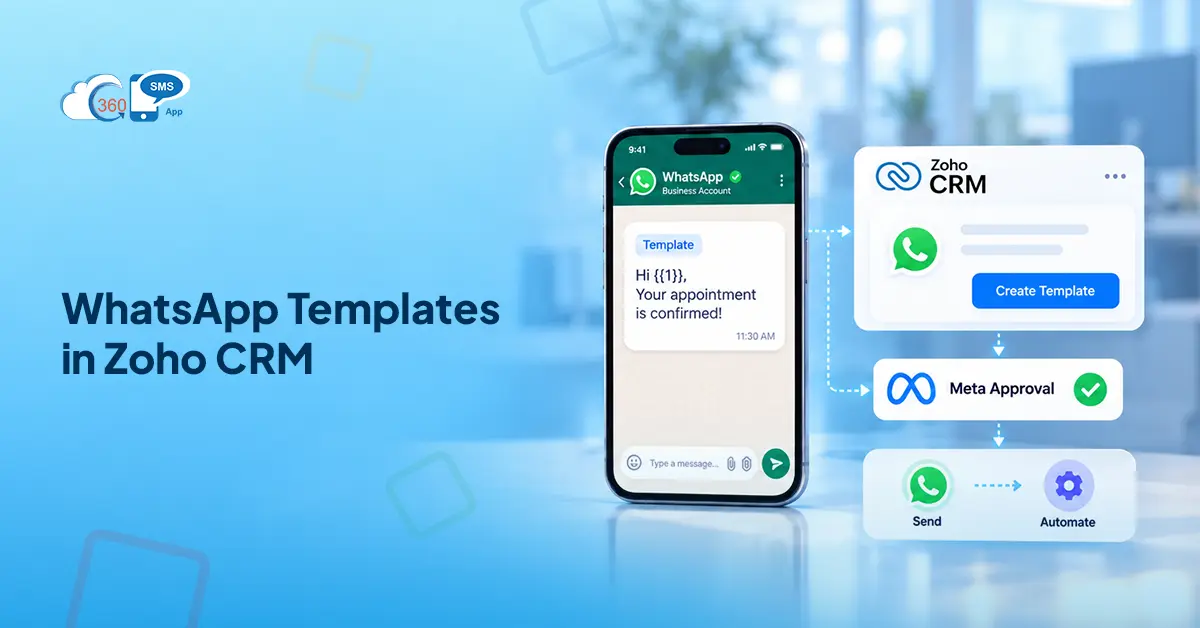
What actually goes to Meta for review is a format. Variable fields — {{1}}, {{2}} — pull live data from your CRM before anything sends: the contact’s name, their appointment slot, the deal stage, whatever you’re tracking in Zoho. Meta signs off on the structure. The content fills itself in per recipient.
Why approval at all? Volume is the reason. WhatsApp Business API is wired for scale, which makes it a target for spam without some gate in front of it. That’s the thing — Meta isn’t checking your content for quality. They’re checking whether the category label is honest, whether what you’re saying lines up with what your business actually does, and whether the variables are specific enough for a reviewer to evaluate. A transactional-looking message that’s actually pushing a sale? Caught. And if mislabeled templates keep coming from your account, it’s not just those templates that get bounced. Your account’s quality rating slides, and that touches everything you send afterward.
The 3 Categories of WhatsApp Templates (and When to Use Each)
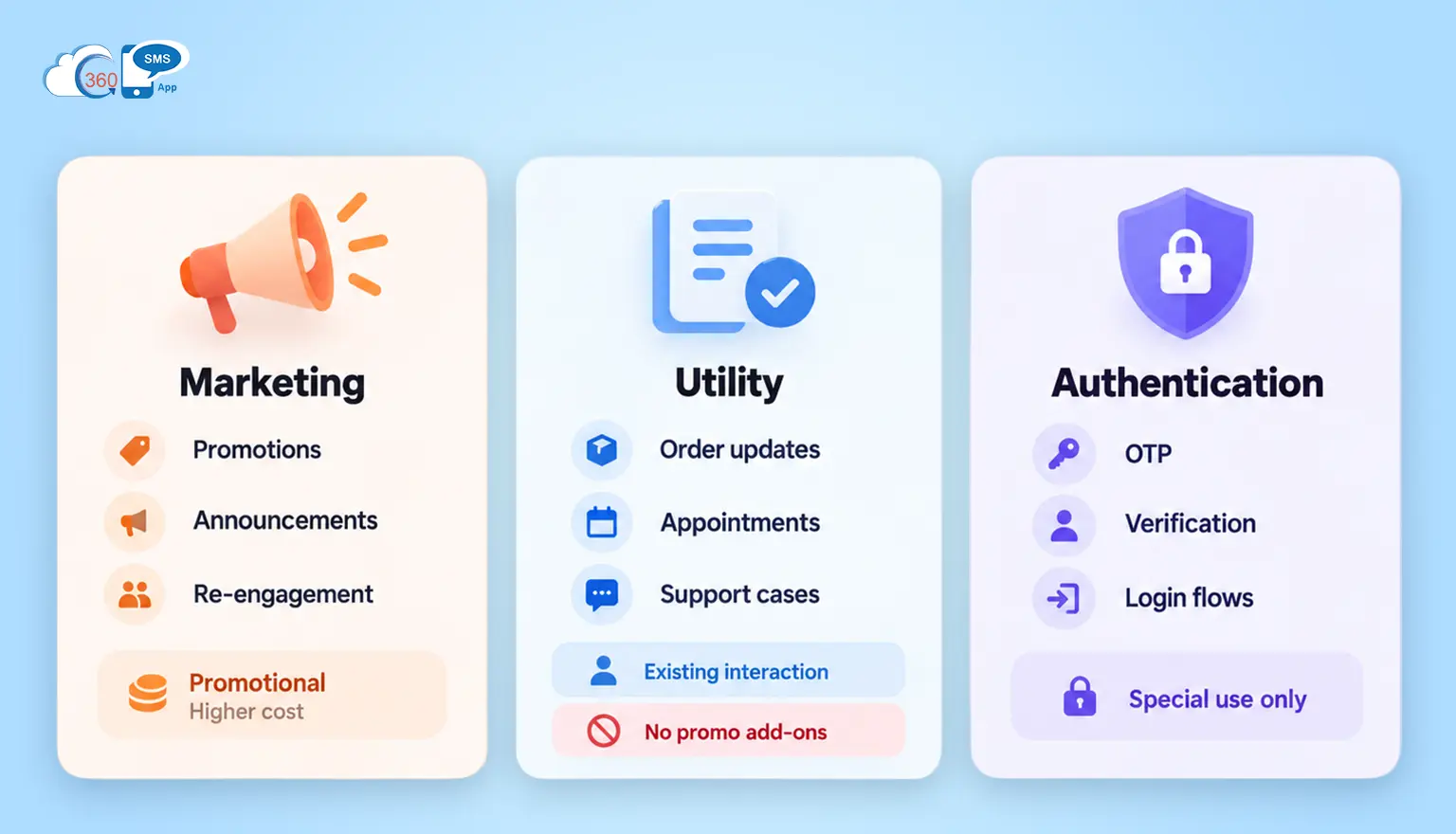
Rejected on first submission? The category is almost always why.
Every template gets a label before it goes to Meta. That label needs to match what the message actually does — not what you think it does, not what you’re hoping will clear faster.
So where does marketing start and utility end? Marketing covers anything designed to get someone moving — promotions, re-engagement messages, announcements, product updates the customer didn’t ask for. Higher billing rate. Which is fine, as long as you label it honestly.
What gets misused constantly is utility. These messages have to be tied to something already in motion. An order placed. An appointment booked. A support case open. Meta’s actual test: does this message serve the customer’s existing interaction with you? Not “does it mention a transaction” — those are different questions. A confirmation message clears. That same confirmation with a sale announcement appended? Doesn’t. The marketing line redefines the whole template’s purpose, and Meta reads it that way. Genuinely, this is the most common resubmission trigger, by a wide margin.
Authentication — OTPs, verification codes — sits in its own category. Relevant only if you’re running verification flows inside the CRM. Most sales and support teams never touch it.
Pick the category before you write a word of body copy. Billing, approval speed, what content you’re allowed to include — all of that flows from the category, not the other way around.
Types of WhatsApp Template Buttons (Supported by 360 SMS in Zoho)
Without a button, you’ve sent a notification. Useful, sure — but the contact has nowhere to go. 360 SMS supports all three button types Meta allows.
CTA buttons are the direct-action option. Two max per template. A URL button drops the contact on a booking page, a payment link, a document — wherever one specific action lives. Phone number buttons connect immediately. In practice, most templates only need one CTA. The two-button option exists for genuinely branching scenarios, not as a default.
Quick Reply buttons are pre-written taps. Three max per template. When the contact taps one, that response fires back automatically — and 360 SMS routes it straight into a Zoho Workflow Rule without anyone manually reading and sorting replies. Lead qualification, service selection, confirmation flows: all running on their own. That’s where real time gets recovered. Teams don’t usually feel how much until the automation’s been live for a week or two.
List/Menu buttons handle the edge cases — situations where three quick replies genuinely aren’t enough. Appointment slot selection, multi-step intake, tiered service menus. Not the first choice. Reach for it only when the other two button types actually can’t do the job.
How to Create a WhatsApp Template for Zoho CRM with 360 SMS (Step-by-Step)
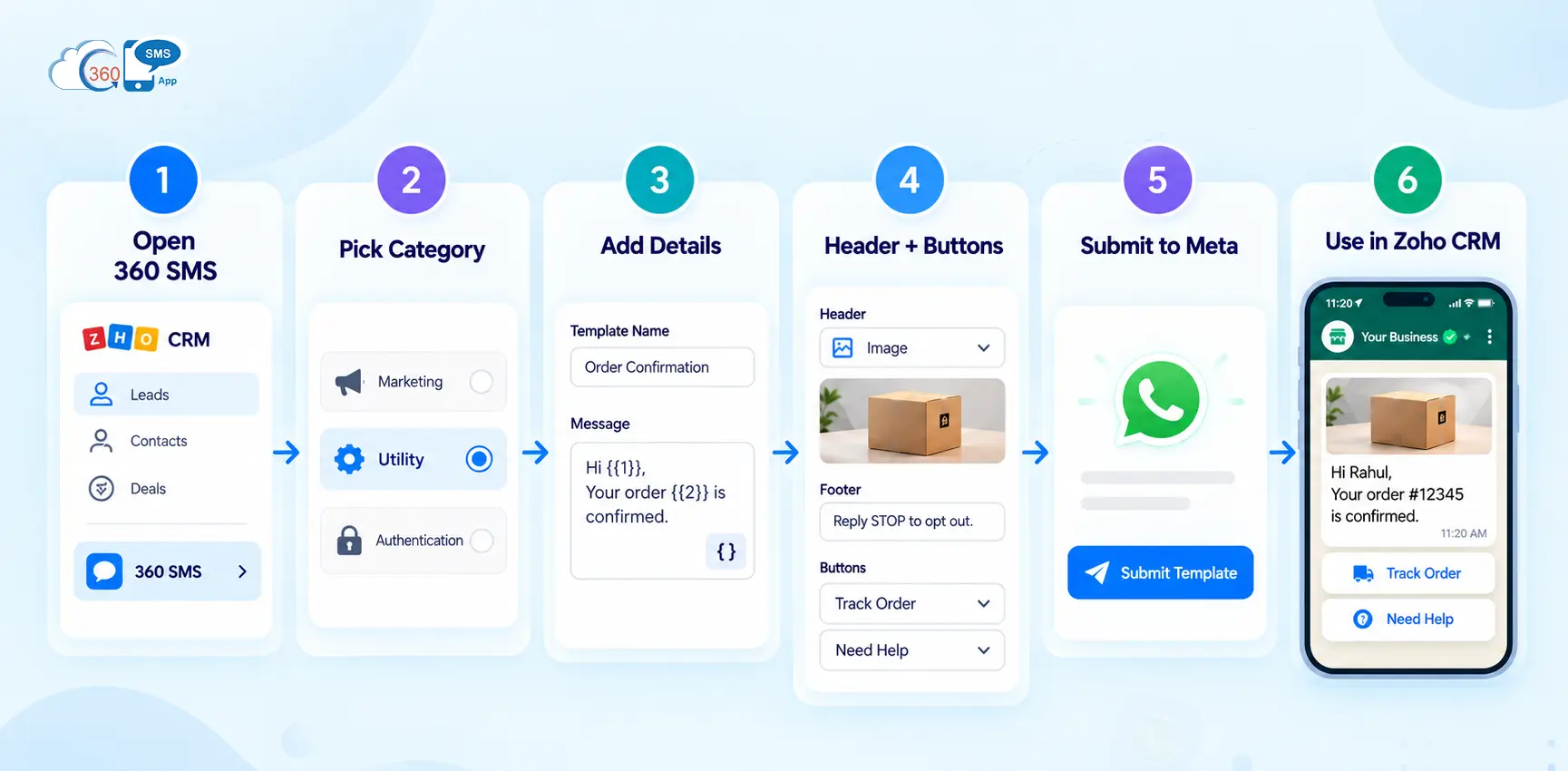
Six steps. All inside Zoho — no separate portal, no parallel login to juggle.
Open the 360 SMS panel on any Lead, Contact, or Deal record and get into template management. Before anything else, you’re making a category call — and it needs to be based on what the message does, not on which category you think clears fastest. This is where most resubmissions originate. Teams pick utility, assuming it draws less scrutiny, then spend 48 hours waiting on a rejection for the same template with the wrong label on it.
Body copy is where most of the work actually lives. Use {{1}}, {{2}} wherever the content changes per recipient. Here’s the part that trips people up: every variable needs enough surrounding text that a reviewer can tell what it maps to. Drop a bare {{1}} into a sentence with no context, and you’ve handed the reviewer nothing to evaluate — which is the same as handing them a reason to flag it. One extra clause of context around each variable usually solves it. (Worth double-checking before you submit — this is a small fix that saves a 48-hour wait.)
Headers go in after the body — image or text, they frame the message visually before anyone reads a word. Footers handle opt-out language. Buttons come last. The sequence matters: decide on your button type and response mechanic before you write the body, not after. Building the button after the body is written sends you back to rewrite the body.
Submission runs directly to Meta from inside 360 SMS. Simple utility templates sometimes clear in under an hour — not always, but it happens. Marketing templates, or anything with a URL Meta hasn’t seen from your account before, should sit in the 24–48 hour budget. Don’t schedule a campaign launch on same-day approval. That lesson tends to land hard the first time.
Once it’s live, the template is available for 1:1 sends, List View bulk sends, and Workflow Rule triggers.
Common Reasons WhatsApp Templates Get Rejected (and How to Avoid Them)
Most rejections trace back to the same handful of mistakes. Worth knowing before you hit submit.
The promotional-in-utility problem causes more resubmissions than anything else. “Your appointment is confirmed — and don’t miss our weekend sale!” Meta reads it as a utility template with a marketing line embedded. Which is not fine. Strip it or re-file it under marketing, which is what it is.
Vague variables are the second most common issue. {{1}} with no sentence context around it gives a reviewer nothing to work with. They can’t tell what maps into that field or whether it’s appropriate — so it gets flagged. Write body copy where every variable’s purpose is obvious from the surrounding text.
URL shorteners don’t pass. Bit.ly, TinyURL, any redirect — not allowed in CTA button links. Full destination URL only. Teams coming from email campaigns carry this habit over without noticing, and the rejection is usually the first signal.
Deceptive content and category mismatches get caught too. And if they keep appearing from the same account, the quality rating takes ongoing hits — not just for those specific templates.
That’s the thing — even clean, properly labeled submissions occasionally come back with a fix request. Meta’s notes are usually specific. Read them, make the change, resubmit.
How to Automate WhatsApp Templates in Zoho CRM with 360 SMS
An approved template that sits in a library and never fires is just overhead.
360 SMS wires directly into Zoho Workflow Rules — not a connector sitting between two platforms, but running inside the Zoho environment natively. New lead comes in: a welcome template fires. Deal moves to Proposal Sent: a follow-up queues for two days out. Appointment record created: confirmation goes immediately, reminder sends the morning before. None of it needs a rep watching the CRM and manually triggering sends.
Bulk sends run from List Views. Filter by deal stage, assigned user, contact source, last activity — attach the approved template, send or schedule. Merge fields pull live CRM data per record before anything goes out. In practice, a 500-contact bulk send lands as individual, personalized outreach to each person because the variables fill from their specific record. That distinction matters to how it’s received.
For building templates from scratch, 360 SMS has an AI-powered template creation tool. Give it the use case — re-engagement after 30 days of silence, post-demo follow-up, appointment reminder for a specific service type — and it generates a working draft. Still goes through your review. Still goes to Meta for approval. But the gap between blank field and ready-to-submit closes significantly, especially when you’re building a batch of templates at once.
How 360 SMS Manages WhatsApp Templates in Zoho CRM
Template sprawl is real. It happens faster than any team plans for.
Forty-plus approved templates across sales, support, and onboarding — no naming logic, two near-identical reminders that different reps built separately, nobody sure which version is current. Finding the right template mid-campaign turns into an actual problem. Genuinely, it’s one of those things that seems manageable until it suddenly isn’t.
360 SMS organizes templates in folders. Sales, support, campaign-specific batches — each group lives where your team expects it. Simple structure. But that simplicity is what keeps a template library usable at scale, versus a pile of files nobody trusts.
Compliance runs automatically. Templates go only to opted-in contacts. And 360 SMS catches opt-out intent without requiring a keyword — someone replying “don’t contact me again” gets flagged and processed without anyone manually reviewing the inbox. Sending to contacts who haven’t opted in isn’t just a policy risk. Accounts get suspended for it.
Final Thoughts
Category accuracy. That’s the hinge.
Get the category right and the rest — body copy, variables, buttons, automation, approval — runs through a fairly predictable sequence. Get it wrong, and you’re back at the start, two days later, with the same template and a corrected label.
Right category, honest content, full URLs, variables with context. Most submissions that land on all four move through on the first pass — not guaranteed, but consistently more likely.