



 A lead writes at 2 pm. Your rep is in a meeting. By 4 pm, that window has closed. They’ve already booked a call with whoever replied first.
Most Zoho CRM teams have lived this. First response speed is what moves a lead to qualified. Not your pricing, not your deck. Just: did someone reply before the lead moved on. Yet the default for most teams is still manual — one message at a time, whenever a rep has a spare minute.
If you’ve searched for Zoho CRM AI auto-reply for SMS or WhatsApp, you’ve probably run into some confusion. What Zoho does natively, what “AI Auto-Replies” means versus “AI Auto-Reply Suggestions,” and where a chatbot fits in — these are three different things. Picking the wrong one for the wrong situation means either building something you didn’t need or missing the feature that actually solves the problem.
What Zoho’s Native AI Can (and Can’t) Do for Messaging
Zia in 2026 is useful for a lot of things. Lead scoring, anomaly detection, conversation summaries, reply drafts. Genuinely solid list.
That’s the thing: Zoho Zia auto-reply isn’t actually a feature. Zia drafts. It cannot send. Still needs a human. Every single suggestion — read it, approve it, push send. That works fine when a rep is actively watching their inbox. It doesn’t work at lunch, at 7 pm, or the moment a campaign goes out and 80 replies hit at once.
The Zoho community has been asking for true AI auto-response for years. The gap is real. It’s why 360 SMS exists inside Zoho as a native extension, not a tool bolted on from outside. When a new message hits a contact record, 360 SMS fires real-time incoming message notifications so the rep knows immediately — before the AI even kicks in. From there, the AI takes over in the ways Zia never could.
AI Auto-Reply vs AI Chatbot: The Difference That Changes Everything
Picking the wrong one here costs you. Either setup time wasted building something unnecessary, or customer replies that land badly because the wrong tool handled them.
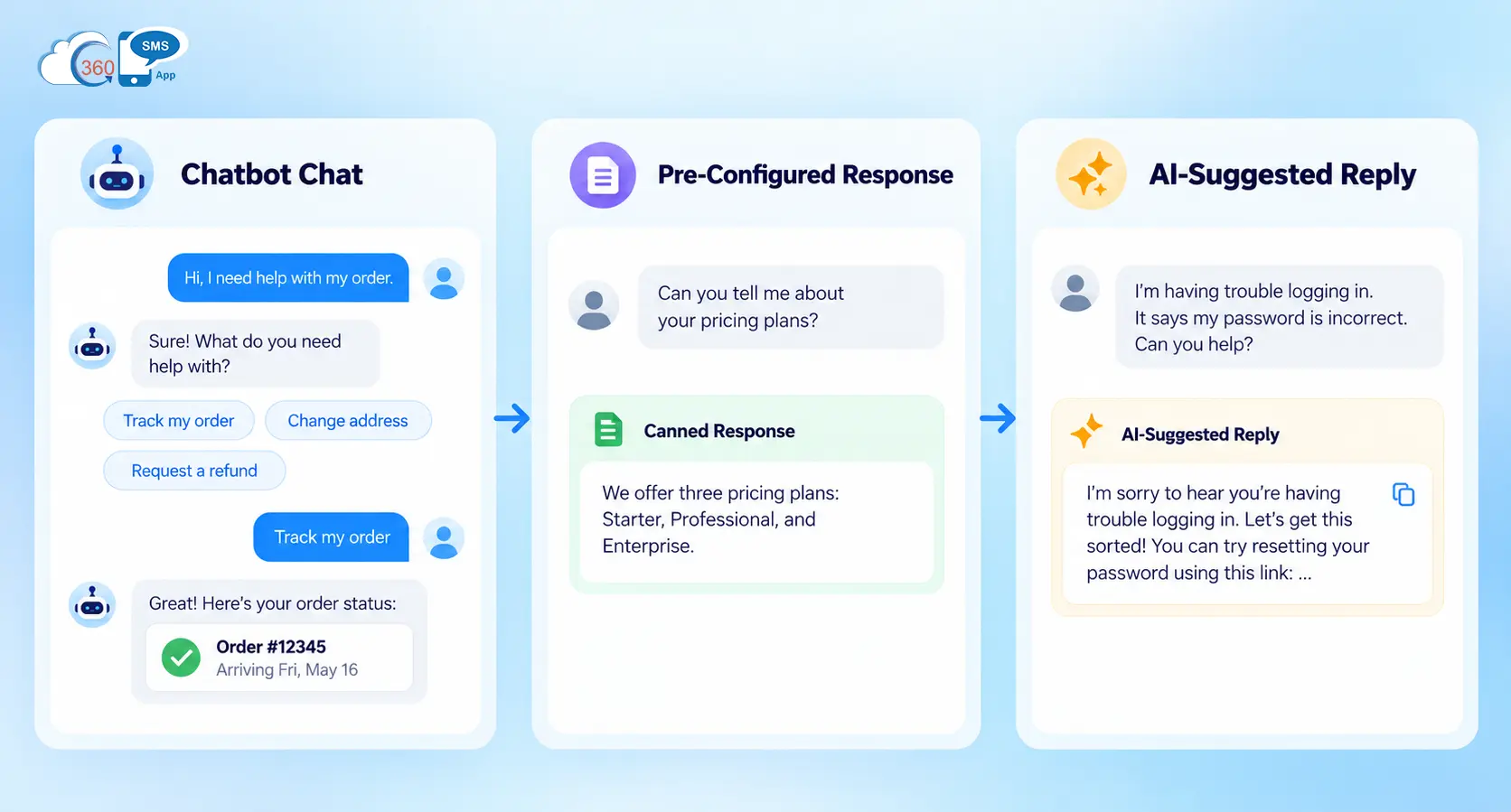
No human in the loop. Ever. That’s how an AI chatbot actually works: reads the message, picks a response, sends it, keeps going. Getting there takes real effort: intent categories to define, conversation flows to wire up, fallback responses to write for when the bot misreads something. In practice, the payoff is genuine scale. But get the training wrong, and it sends a bad reply. The customer knows immediately, and nobody caught it before it went out.
AI Auto-Replies are different. 360 SMS AI Auto-Replies are configured as intelligent automated responses. Not chatbots. Not suggestions. You define the condition, write the response, and when a matching message comes in, it fires automatically. No human step. Set and forget right for after-hours acknowledgments, standard confirmations, any situation where the correct response never changes.
Then there’s a third feature that often gets missed entirely- AI-reply suggestions, where AI reads the incoming message, writes something that fits the context, and the agent reviews it before anything is sent. One click if it’s right. A quick edit if it needs tweaking. Write from scratch if the AI missed. A human is always in the loop. The speed advantage: seconds instead of minutes, without removing the judgment that stops a bad reply going out.
So the honest call. AI Auto-Replies for predictable, configured responses that need no human at all. AI Auto-Reply Suggestions for live conversations where context and tone matter and a human should stay in the loop. The AI ChatAgent — 360 SMS’s fully autonomous bot — for high-volume, repetitive inbound queries where the right answer is always the same.
Three tools. Three different jobs. 360 SMS supports all of them natively inside Zoho CRM.
How AI Auto-Reply Works Inside Zoho CRM with 360 SMS
Here’s what the actual workflow looks like.
A contact sends a message via SMS or WhatsApp. 360 SMS reads it and drops a suggestion into the message composer inside Conversation View — right alongside the deal stage, contact history, and the full CRM record. The agent sees the customer’s context and the suggested reply in the same place, on the same screen. They click send if it fits. They edit if it needs a tweak. They ignore it and write from scratch if it’s off. Nothing goes out automatically unless an AI Auto-Reply rule is set up to do exactly that.
Related Record Owner Assignment means the incoming message is automatically tied to the right record owner too. The suggestion lands in front of the correct rep, not a shared inbox nobody’s actively watching.
Worth saying: the AI draws from the conversation thread and CRM data on that specific record. The deal stage matters. The previous messages matter. 360 SMS reads all of it. That’s what separates a useful suggestion from a generic one — and it’s what Zoho CRM AI messaging looks like when the tool is actually built for the platform rather than connected to it from outside.
When AI Auto-Reply Adds the Most Value in Zoho
Speed matters most in specific situations. Here’s which 360 SMS feature handles each one.
After-hours responses go to AI Auto-Replies. Set the condition once, write the response, and it fires automatically when a customer messages outside business hours. No rep needed at 10 pm. The customer knows they’ve been heard. That acknowledgment alone keeps more leads in the funnel overnight than most teams account for.
High-volume support periods are where AI Auto-Reply Suggestions earn their place. When 50 or more inbound messages land simultaneously, suggestions cut drafting time from two minutes to under ten seconds per message. The rep still sends every reply. They just aren’t composing from scratch each time.
Sales follow-ups: a lead replies “Sounds interesting, tell me more” and the AI reads the deal stage and previous conversation to surface a relevant next step. Rep sends in seconds instead of writing from scratch. And when a bulk WhatsApp campaign — launched directly from a Zoho List View inside 360 SMS — generates 100 replies, working through all of them without AI help is just slow.
For teams building responses to similar inbound queries at volume, AI Template Generation removes the blank-box problem. Rather than writing from scratch every time, 360 SMS generates contextually appropriate templates that the team can refine and save for reuse.

What Response Time Actually Does to Lead Conversion
This isn’t a feature conversation. It’s a math conversation.
Research shows leads are 7 times more likely to qualify if contacted within the first hour versus 24 hours later. After just five minutes, lead conversion probability drops by 80%. That number matters, and most teams haven’t actually fixed the thing causing it.
Worth saying: 360 SMS delivery tracking and read receipt monitoring show you not just whether a message was sent, but whether it was read. Knowing a lead opened the WhatsApp message but didn’t reply tells a rep when to follow up — not guess. AI auto-reply doesn’t replace your sales team. It removes the gap between message received and message replied, which is the only gap that Zoho SMS AI response tools can close in a single step.
Final Thoughts
Zoho Zia is genuinely useful. But it can’t send. For teams managing real inbound volume across SMS and WhatsApp, that’s the whole problem.
360 SMS fills that gap with three tools that do different things: AI Auto-Reply Suggestions for conversations where a human stays in the loop, AI Auto-Replies for configured responses that fire without rep involvement, and an AI ChatAgent for fully autonomous inbound handling at scale. Layer in AI Template Generation for outbound efficiency, AI Compliance for intent-based opt-out detection that keeps your messaging legally sound, and folder-based template management so reps aren’t scrolling through a flat list of 40 templates mid-conversation.
All of it runs natively inside Zoho CRM, across SMS, MMS, and WhatsApp, on every Zoho plan. One subscription, no platform switching, live in 15 minutes.


