




 Here’s what happens in most Zoho CRM teams. A rep closes a deal. Three weeks later, the account manager asks what was actually promised. Nobody knows. The conversation was on someone’s personal iPhone and never made it to Zoho.
That’s the problem. Not “lack of visibility.” Just missing data, sitting on a phone the company doesn’t own.
The fix is an SMS and WhatsApp app that works inside Zoho. Not one that syncs to it overnight. Not one that lives in a separate browser tab. Inside. On the record. When a rep opens a Contact, the full conversation history is right there.
360 SMS App is a Zoho Marketplace-verified app covering SMS, MMS and WhatsApp. One install, no external login. Whichever app you shortlist, run it against the criteria below.
What Should an SMS and WhatsApp App for Zoho CRM Do?
Reps texting from personal phones and nothing getting logged. That’s the starting point for most of these searches. And it’s the right one to focus on. The mistake is evaluating apps against their own feature pages instead of the specific gaps causing the problem.
Here’s what a good app needs to handle. Not what vendors highlight. What actually breaks when it’s missing.
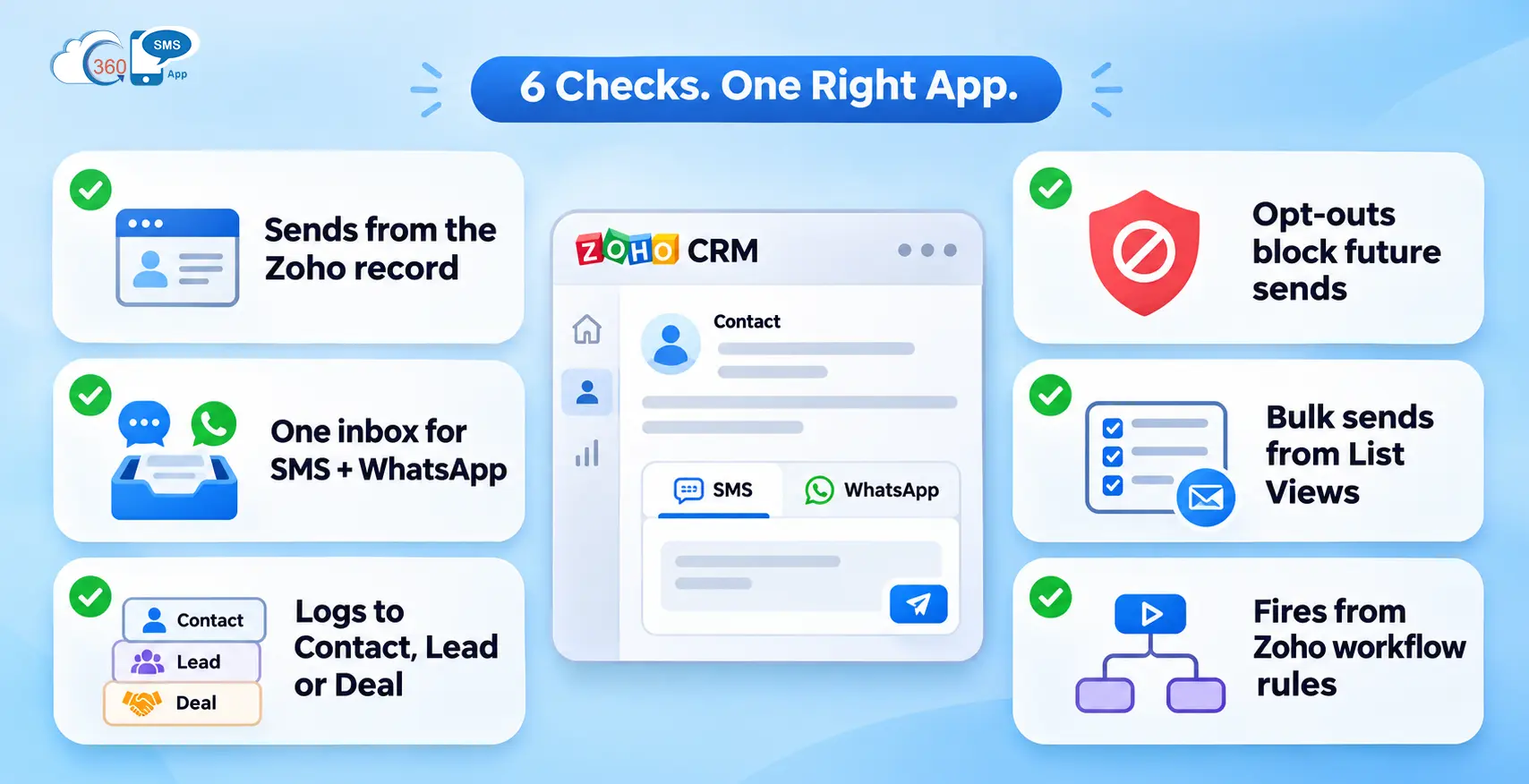
Native placement: Reps send and read on the Zoho record. No second login, no extra tab. If an app pushes you to a separate interface to compose messages, that’s not native placement — whatever the listing says.
Record logging: Every message on both channels stores against the right Contact, Lead or Deal. So the history outlives staff changes, and nobody’s chasing down a former rep’s phone when a deal goes sideways.
One shared inbox: SMS and WhatsApp replies in one view, with assigned owners and statuses. Not two queues. One.
Bulk sends from CRM views: Campaigns run from filtered lists your team already has in Zoho, with merge fields pulled directly from the record.
Consent and opt-out handling: A missed STOP reply is a legal problem, not a minor gap. Opt-outs need to update the record and block future sends on both channels without someone manually intervening.
Automation hooks: Texts go out when a lead arrives, a deal changes stage or a booking is confirmed. Without someone pressing send.
Bulk messaging deserves its own test before you commit to anything. This guide to bulk SMS and WhatsApp campaigns from Zoho CRM shows what a well-run send actually looks like. Worth checking before you finalize your scorecard.
How Do Native Apps, Connectors and Separate Portals Compare?
Three types of tools connect messaging to Zoho. The type matters more than the feature count.
A Zoho-native Marketplace app keeps everything on the CRM record. Reps send, receive, and read conversations without leaving Zoho. Data stays where it belongs. Check which modules are supported and whether both channels actually share one inbox — not every app does, even when it claims native status.
Connectors and sync tools split the work between Zoho and the vendor’s own console. Data copies across on a schedule or trigger. The honest questions to ask: how long are sync delays, what happens when a sync fails, and which fields actually map across? Those answers rarely come up in a product demo.
A separate portal is a second browser tab, a separate login, and conversations that may or may not ever reach the CRM depending on how the vendor handles exports. Some teams make it work. Most don’t, over time.
For teams that live inside Zoho all day, the choice is obvious. Switching tools mid-conversation is exactly why reps stop logging things. No connector fixes that habit.
How Does WhatsApp Change the Evaluation for Zoho Teams?
Good SMS support doesn’t mean good WhatsApp support. That’s the thing most teams only discover after they’ve already installed the app.
WhatsApp Business messages run through Meta’s platform, which means a verified business profile, a registered number and Meta-approved templates before you can reach any customer first. Once a customer replies, a 24-hour window opens and your team can respond freely. After it closes, another approved template is needed to restart. So every outbound workflow your team runs on WhatsApp depends on having the right templates ready and cleared in advance.
Which is why the template question is the most important one to ask any vendor.
Can templates be built, submitted and tracked from inside Zoho? Not from a separate Meta portal. Merge fields should map directly to Zoho record fields. When a customer taps a quick-reply button, that answer needs to log on the record automatically. And opt-outs on WhatsApp should update the same consent field as SMS opt-outs. One field, not two separate ones to reconcile later.
Worth saying: this is exactly where most apps that claim to “support WhatsApp” actually fall short. The channel works. The CRM integration around it doesn’t.
For more context, Zoho CRM WhatsApp use cases covers how sales and support teams use the channel day to day.
How Do You Run a Fair Trial of Zoho Messaging Apps?
Feature checklists are easy to game. A structured trial isn’t. Give every shortlisted app the same five steps, with your actual data, so the results mean something when you compare them side by side.
Install in a sandbox. Check permissions, page placement and module mapping before anything touches live records. Mistakes here are free to undo.
Send on both channels. Text and WhatsApp test contacts from a Lead, a Contact and a Deal. Each reply should log to the right record. If one doesn’t, that’s not a minor configuration issue.
Run a small bulk send. Message a filtered list view, check delivery reports, verify merge fields populated correctly, time how fast replies arrive. All four, not just the ones that work.
Test an opt-out. Reply STOP from a test phone. If the record doesn’t update and the next send doesn’t skip that contact, the app failed. Full stop.
Measure setup effort. How long did it take? Which steps needed vendor involvement? Could your admin repeat the whole thing alone tomorrow? That question tells you more about real ongoing admin load than any feature comparison will, and most teams skip it entirely.
How Does a Zoho-Native Option Measure Up Against These Criteria?
Here’s how 360 SMS App lines up against the same scorecard.
Fully Zoho-native. Messages go out from the record, replies come back to the record, and the full conversation history sits in Zoho next to the contact it belongs to. No portal redirect, no second login. Worth noting: some apps display conversations in Zoho but route you to a separate interface to actually compose. That’s a meaningfully different experience from what most listings suggest, and it only shows up once someone’s using it every day.
No separate analytics tool needed. Delivery tracking and read receipts are built in, and link shortening with click tracking sits in the same place.
Around the clock, the AI ChatAgent handles inbound queries on SMS and WhatsApp autonomously. So your team isn’t tied to business hours for first responses. Reps get notified and step in directly from Conversation View when a conversation needs a person. AI Auto-Reply Suggestions surface contextual recommendations right inside that view, so responses go out faster without starting every message from blank.
The 360 SMS for Zoho CRM page lists every channel and feature for a full side-by-side check against your scorecard.
Wrapping Up
The best SMS and WhatsApp app for Zoho CRM is one your reps use without leaving the record. Both channels logged. WhatsApp templates and opt-outs handled properly. Less admin work, not more. Three things usually decide it: true native placement, one shared inbox with one consent record, and low setup overhead. Shortlist two or three, run each through the same sandbox trial with your real data, and go with the one that clears every step without workarounds.
Every SMS. Every WhatsApp. All in Zoho. Book a Demo.


