 Twilio is an API. It delivers messages. That’s what it does.
The send button on a Contact record, the message thread, the team inbox, the template picker. None of that ships with Twilio. Your team builds it. And every time Salesforce pushes an update, somebody has to make sure nothing breaks.
A native AppExchange app starts on the other side of all that work. For most sales and service teams, that’s the cleaner choice. The build route makes sense in a few specific situations, and it matters which one you’re actually in.
Table of Contents
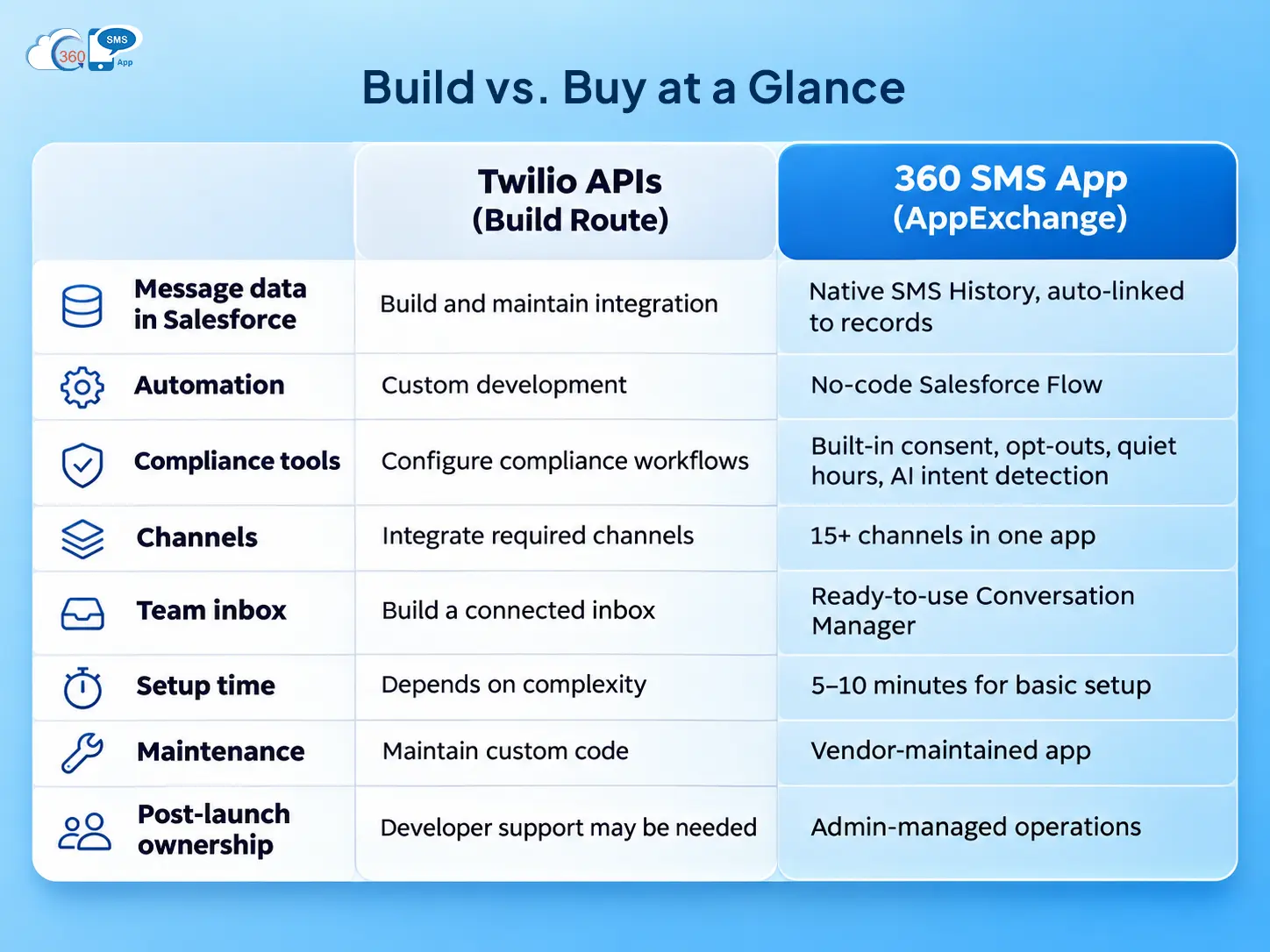
What each route gives you before any code is written
Twice a year, Salesforce ships a release. Mark it on your calendar if you’re maintaining a custom integration, because every release is a moment where something you built might need a fix.
That’s the actual maintenance burden nobody prices during the initial estimate. Developers quote you the build. They don’t quote the two-year support contract implied by keeping it alive.
A native AppExchange app carries that burden differently. The vendor maintains it. When Salesforce updates, the vendor pushes a compatible version. Your admin configures changes. No code, no ticket, no developer pulled off something else.
Whether the API route makes sense depends on who maintains the integration, and for how long.
Twilio vs native Salesforce SMS app: the criteria that decide it
Where the message data lives
Six months after launch, a sales manager asks for a report on texts by Opportunity stage. On the Twilio route, the answer depends entirely on how the integration was built, whether message data was written back to Salesforce, what object it’s linked to, and whether the right reporting field was set up during development. Usually nobody thought about that in month one.
With 360 SMS, every text lands in an SMS History custom object, linked to any standard or custom Salesforce record automatically. That report is just there.
Worth saying: data architecture decisions you skip at setup don’t stay skipped. They turn into support tickets six months later.

Automation without a developer in the loop
The first time a rep asks for a follow-up text trigger and the response is “add it to the backlog,” something shifts. The automation doesn’t get built this sprint. Maybe next sprint. Usually it gets deprioritized when something urgent comes up.
Salesforce Flow handles this natively for a packaged app. A Flow sends a message by creating a Scheduled SMS record. No code required, no ticket to file. An admin can build it on a Thursday afternoon.
Speed is part of it. The bigger issue is whether automation that requires a developer request gets built at all.
Compliance controls and who is liable for them
A contact replies: “I’d rather not get these anymore.” No STOP keyword. Plain English.
Keyword-only opt-out detection misses that. The contact stays on the list. If a regulator looks at this, the response “our system only watches for STOP” is not a defensible position.
TCPA and GDPR apply to whoever sent the message, not to Twilio. 360 SMS uses AI intent recognition, so a plain-language opt-out triggers the same process as a formal STOP, with the Lead or Contact field updated automatically and an audit trail built in. Quiet-hour controls and consent tracking are included at every plan level, no add-on required.
On the Twilio route, all of this is on your backlog.
Did you know?
360 SMS detects opt-outs through AI intent recognition, not keyword matching. A contact who replies “I’d rather not get these” triggers the same opt-out as a formal STOP. That closes a compliance gap most teams don’t discover until a complaint shows up.
Channels beyond SMS
Your team wants to add WhatsApp. On the Twilio route, that’s a new project. New endpoints, a new template approval flow, a new inbox build. Every channel is its own scope of work.
360 SMS runs SMS, MMS, WhatsApp, RCS, Facebook, Instagram, LinkedIn, Viber, LINE, WeChat, KakaoTalk, Webchat, Ringless Voicemail, and more from one app inside Salesforce. No middleware, one licence. See the full list of supported channels.
RCS is worth calling out specifically. Branded messages with images, videos, and tappable buttons, sent from CRM records without a developer involved.
Cost and total ownership
The developer who built the integration has moved on. That’s usually when the full cost of the Twilio route becomes visible.
The initial invoice showed messages and phone numbers. It didn’t show developer time for the UI, templates, inbox build, consent handling, and reporting. It didn’t show hosting, monitoring, or the ongoing maintenance that someone now has to do because the original person isn’t there.
360 SMS App starts from $7 per user per month. That covers 15+ channels, with no hidden fees, a 7-day free trial, and optional add-ons like AI texting, drip campaigns, link tracking, and voice drops.
In practice, the staffing gap shows up in year two. The first month’s invoice never shows it.

Maintenance, security and support
When something breaks at 11 pm on a Tuesday, who gets the ticket?
Your developers built it, so your developers fix it. For as long as the integration exists.
360 Degree Cloud holds a SOC 2 Type 2 certification covering security, availability, confidentiality, processing integrity, and privacy, following an independent third-party audit. 24×7 technical support is included in the plan.
That’s the thing. Custom integrations don’t expire, and they don’t become someone else’s problem. They just accumulate edge cases.
When building on an API is the right call
There is a version of this where Twilio wins.
Messaging as a product feature you’re selling is different from messaging as a CRM workflow you run. If your routing logic is unusual enough that no packaged app handles it, the API fits better. If your platform team already maintains similar integrations and wants one more under the same architecture, that’s a reasonable call.
To be fair, the two aren’t mutually exclusive. 360 SMS includes an Open API so enterprise teams can bring their own phone numbers and telephony provider. You keep your carrier rates. The inbox, automation, and compliance layer come from the app. For teams locked into carrier contracts, that tends to be the cleaner arrangement.
How to decide in five steps
- Write out every text your team sends today. Who triggers it, from which Salesforce object, what should happen when the customer replies. The list is usually longer than teams expect. That length is what makes the build estimate honest.
- Price the whole build. The Twilio invoice shows messages and phone numbers. Developer time for the interface, templates, consent handling, inbox, and reporting is not on that invoice. Neither is hosting, monitoring, or the ongoing maintenance that the integration needs as long as it runs. Put a real number on all of it.
- Check where message data gets stored. Ask directly: where does consent live on a Salesforce record? Where does message history go? Both reporting and compliance depend on this, and neither is easy to fix retroactively.
- Run a trial. Install a native app in your sandbox and have an admin build one real workflow from your list. 360 SMS takes around 5 to 10 minutes to set up. That’s a cheap experiment for an expensive decision.
- Name who owns it after launch. An admin can own a packaged app indefinitely. An API integration needs an engineering owner its entire life. If that person isn’t in the budget, you already have your answer.
Conclusion
For most teams, the Twilio vs native Salesforce SMS app decision comes down to three things: where message data lives after a text is sent, whether admins can build and change automation without filing a developer ticket, and what the full cost looks like in year two, not month one.
Write out the workflows. Price the actual build. Run a sandbox trial on your own records.
The right route usually shows up before you finish the second step.