Most Salesforce teams hear “Agentforce” and assume it’s something they need to go set up separately — a new product, a new license, another implementation project. That assumption is costing them time they don’t have.
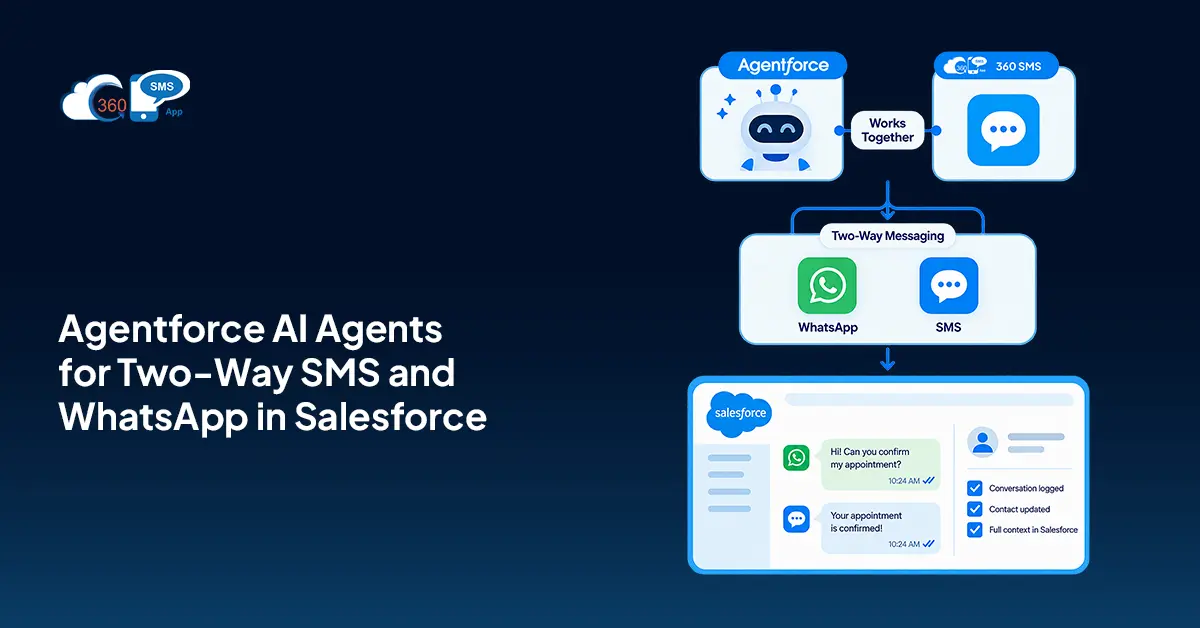
If your team is already on 360 SMS App, you’re already running Agentforce. The AI inside 360 SMS is Agentforce-powered. Every AI feature — the conversational replies, the chatbots, the compliance monitoring, the drip intelligence — that’s Agentforce doing the work, right inside the Salesforce environment you’re already in.
So the real question isn’t “how do we get Agentforce SMS WhatsApp Salesforce working.” It’s “are we actually using what’s already there.” For most teams, the honest answer is no — not fully. Here’s where to start.
Table of Contents
If You’re on 360 SMS, You’re Already Running Agentforce
Worth saying plainly: 360 SMS App is 100% Salesforce-native. And the AI layer built into it — the features that handle conversations, flag compliance risks, suggest message timing, and read opt-out intent — runs on Agentforce.
That means Agentforce messaging isn’t an integration you configure on top of 360 SMS. It’s what 360 SMS AI actually is. When a rep gets an auto-suggested reply in a live WhatsApp thread, that’s Agentforce. When a chatbot qualifies a lead over two-way SMS Salesforce without anyone in the queue, that’s Agentforce. When the system catches an opt-out buried in plain language and removes the contact automatically — still Agentforce.
No separate rollout. No IT project. The Salesforce WhatsApp AI agent capability and SMS agent capability are already sitting inside your 360 SMS instance. The gap for most teams isn’t access. It’s activation.
Reps Find it Difficult to Keep Up With Two-Way Conversations at Volume
Forty inbound messages in a day. A rep handles fifteen properly. The rest sit there — not ignored on purpose, just buried.
Manual reply workflows don’t scale past a certain point. And when you’re running SMS and WhatsApp at the same time, the backlog doubles without adding a single new contact to the list. The instinct is to hire more people. But that math stops working fast.
360 SMS addresses this through two Agentforce-powered capabilities. For active one-on-one conversations, AI-powered P2P messaging surfaces a suggested reply right inside the chat window — drafted from the live conversation context — so the rep reads it, adjusts if needed, and sends in seconds. No blank text box. No guessing what to say next. For threads that don’t need a rep at all, the Agentforce-powered iText chatbot runs the conversation end-to-end automatically — qualifying leads, answering FAQs, collecting details — and escalates to a human only when the thread actually calls for one.
Two scenarios. Two Agentforce-powered features. One place inside Salesforce.

Repetitive Threads Are Eating the Team’s Time
Here’s a pattern that shows up in almost every sales and service team: the same ten questions, arriving through SMS and WhatsApp, dozens of times a week. Pricing. Availability. How to book a call. Basic case status updates. None of these need a human — but they’re landing in human inboxes anyway.
The Agentforce-powered chatbot feature in 360 SMS, built through iText, handles these threads end-to-end. A contact asks about pricing — the chatbot responds. They want to book a call — it collects the details. They go off-script — the conversation escalates to a rep, with the full thread already on the record.
And you don’t need a developer to build this. iText is point-and-click inside 360 SMS. You set the questions, the answer paths, the escalation triggers — done. No code, no IT ticket, no maintenance cost.
So a team running Agentforce messaging across SMS and WhatsApp isn’t managing a reply queue for these conversations. They’ve built the logic once. The Salesforce WhatsApp AI agent and SMS agent run the thread. Reps step in only where it actually matters.
Campaigns Go Out Fast but Land Flat
Speed without relevance is just noise at scale. A campaign that reaches 5,000 contacts via two-way SMS Salesforce means nothing if the timing is wrong or the message doesn’t fit where those contacts are.
Two Agentforce-powered features inside 360 SMS address this directly.
AI drip suggestion looks at behavior and engagement patterns across the batch and recommends better timing and message adjustments. So a cold lead who hasn’t opened anything in three months isn’t getting the same sequence cadence as someone who replied to the last two messages. The campaign adjusts. Not per individual contact — across the batch, based on how the audience is actually responding.
Before any of that, template quality score gives you a read on the message itself. Every template gets scored on clarity, compliance, engagement, and structure before it goes out. If something’s likely to underperform, you see it before the send — not in the report three days later.
That’s the version of Salesforce text messaging automation 2026 that actually moves numbers. Not faster sending. Smarter sending.
Compliance at Scale Is a Manual Nightmare
High-volume messaging creates compliance exposure fast. And the manual approach — someone reviewing threads, someone managing opt-out lists — doesn’t hold up once you’re running thousands of conversations across SMS and WhatsApp simultaneously.
360 SMS handles this through two Agentforce-powered features that run without anyone watching.
AI compliance monitoring tracks conversations in real time. It flags risks, catches spam signals, and surfaces suggestions before a problematic message goes out. No manual review queue. The system catches it first.
Opt-out detection works on intent, not keywords. If a contact replies “please stop messaging me” or “I’m not interested, take me off your list,” the AI reads that as an opt-out — even without a standard STOP keyword — and removes them automatically. For a Salesforce WhatsApp AI agent running across a large contact list, that’s not optional. It’s what keeps the whole operation legally clean.
Honestly, this is the feature most teams don’t think about until something goes wrong. Better to have it running before that happens.
Where This Actually Shows Up — Sales and Service Use Cases
Sales teams are getting the most out of Agentforce SMS WhatsApp Salesforce in three places right now.
Inbound lead response. A lead fills out a form, gets an automated SMS within seconds, and the Agentforce-powered AI qualifies them through a two-way SMS Salesforce conversation — company size, timeline, current tools. By the time a rep gets involved, the lead is already scored. The rep isn’t starting from zero.
Re-engagement. Cold leads who haven’t responded in 90 days get a WhatsApp message. The Agentforce messaging agent handles the follow-up thread, reads whether there’s renewed interest, and routes warm responses to a rep immediately. Not the next morning.
Service teams use it differently — mostly ticket triage and status updates. A case opens, the AI sends a WhatsApp confirmation, handles follow-up questions, and only pulls in a human when the issue goes beyond what the agent can resolve. Reps see the threads that need them. Everything else runs on its own.
Wrapping Up
Agentforce is the reasoning layer. SMS and WhatsApp are the channels. The two need to be connected before any of the AI agent use cases above actually work in production.
The architecture is straightforward: Salesforce data plus Agentforce intelligence plus a native messaging platform handling the channel layer. 360 SMS fills that third piece — natively, inside Salesforce, with compliance and conversation management built in.
Build the channel layer first. The AI agent use cases follow naturally once messages can actually move.
Ready to connect Agentforce to real two-way SMS and WhatsApp conversations? Book a demo with 360 SMS and see the full architecture running inside Salesforce.