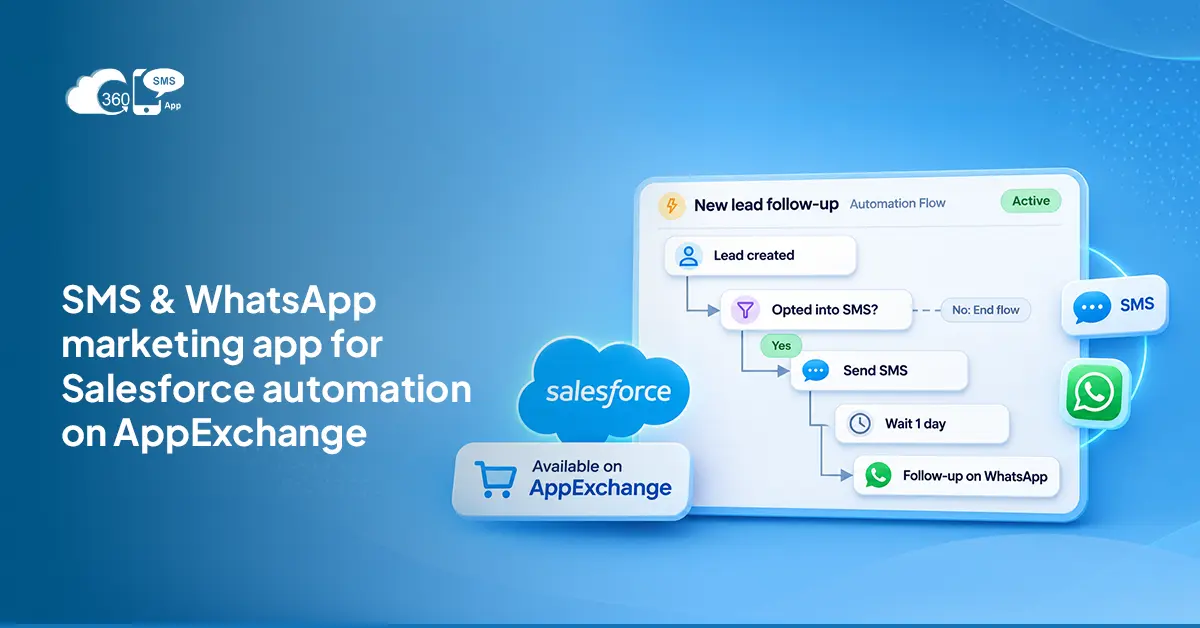
 The best AppExchange SMS and WhatsApp marketing app for Salesforce runs natively in your org, starts journeys from Flow automation and record changes, and stops or branches the moment a customer replies or opts out. 360 SMS App is a Salesforce-native AppExchange app for bulk messaging and automation, and it has gathered 1,200+ AppExchange reviews. Whichever vendor you shortlist, judge it on how much of the journey your administrator can build and change without code and on how cleanly every message reports back to Salesforce.
For US marketing and RevOps teams, text messaging carries stricter consent expectations than email, while WhatsApp tends to matter most for international, multilingual and travel-heavy customers who already use it every day. That mix means channel choice, consent data and timing need to live in Salesforce itself, where both your journeys and your reports can read them.
Table of Contents
What should an AppExchange SMS and WhatsApp marketing app automate?
Messaging automation leaves less room for error than email, because a text or WhatsApp message lands on a personal device and is usually read within minutes, so each automated step should know what the contact has already done, said or bought.
Event-based triggers
Journeys should start from Salesforce events such as a new Lead, an Opportunity stage change or a renewal date, rather than from lists uploaded by hand, so that messages arrive when customers actually expect to hear from you.
Channel choice and fallback
The journey should pick SMS or WhatsApp from consent and preference fields on the record, and if using RCS, it should fall back to SMS channel when a message cannot be delivered instead of silently dropping the contact.
For businesses serving multilingual audiences over WhatsApp, auto language translation across languages can also help teams communicate with customers in their preferred languages.
Automating customer interactions
Automation should also extend to customer responses, not just outbound messages. AI-suggested replies can help agents respond to incoming SMS and WhatsApp messages faster. Meanwhile, chatbots can automate customer interactions around the clock, handling common queries without requiring an agent to respond to every message. This helps businesses maintain timely conversations while reducing repetitive work for their teams.
Drip campaign automation
Look for more than scheduled, templated follow-ups. Advanced messaging apps can help marketers build personalized, stage-wise drip campaigns based on customer engagement and behavior.
With 360 SMS, AI-Based Drip Suggestions recommend sequences, content, and timing using past engagement, message performance, and customer behavior. Marketers can also generate content and create dynamic email, SMS, and WhatsApp drip campaigns through a point-and-click experience, ready for review, approval, and launch.
Consent and timing controls
Consent handling is where most automated journeys fail an audit, so check these controls in detail rather than accepting a demo slide that says compliance is covered.
Opt-outs on both channels
A STOP reply or a WhatsApp opt-out should update the record immediately and end every active journey for that contact, and the change should block later sends from any user, campaign or Flow.
AI-powered compliance adds another layer to opt-out handling. 360 SMS uses AI to recognize opt-out intent in customer messages, rather than relying only on specific keywords. This helps teams identify messages that communicate a request to stop receiving communications and manage opt-outs more effectively.
Quiet hours by time zone
Sends should follow each recipient’s local time across the US time zones, with frequency caps that prevent one contact from receiving several promotions in a single day when campaigns overlap.
How does Flow automation drive SMS and WhatsApp journeys on AppExchange apps?
Record-triggered Flows cover most marketing moments, such as a form fill, a trial expiry or an order that has shipped, while scheduled paths handle date-based messages like renewals and event follow-ups that need to go out days in advance.
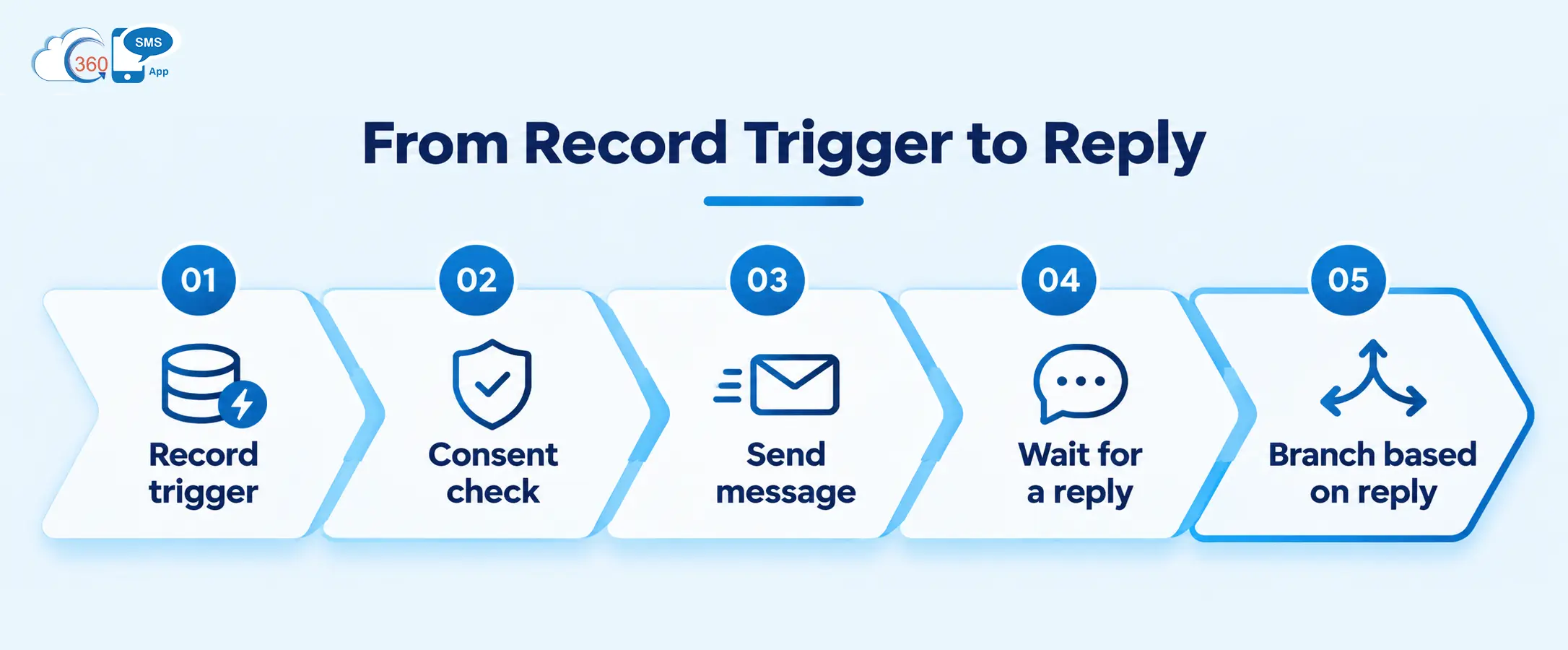
The app can automate messages over any channel through Apex, Flows, Workflows and integrations, so teams never have to write code unless they want to, and it adds zero-code iText surveys, dynamic sender numbers, dark-hour aware scheduling and keyword processing of incoming texts. WhatsApp messages can also go out from workflows, lead updates, service cases or campaigns, which lets marketing journeys reuse triggers that sales and service teams already maintain.
Developers still have a role when a journey needs logic that Flow cannot express neatly. Automations in the app take minutes to create, and they can run through Workflows or by calling the app’s methods from a global Apex class. The guide to Salesforce WhatsApp messaging automation shows how those pieces fit together.
How do you build your first automated journey in Salesforce?
Start with one journey that has a clear goal and a short path, and add branches only after you trust the data and the reporting, because a simple journey that works teaches the team far more than an ambitious one that stalls.
- Define one goal: choose a single outcome, such as a booked demo or a renewal, and decide which Salesforce field will record it.
- Pick the trigger: select the record event or date that starts the journey, and exclude contacts without consent for either channel.
- Map the channel path: send the first message on the preferred channel, with a fallback for failed delivery or missing WhatsApp consent.
- Add waits and branches: space messages sensibly, branch on replies or link clicks, and end the journey as soon as the goal is reached.
- Test with internal records: run the journey on staff contacts across both channels to check merge fields, timing and reply logging.
Its drip campaigns schedule templated messages, ringless voicemail, surveys and conversation trees at precise time offsets across SMS, WhatsApp, voicemail, Facebook Messenger, and 11 other channels natively inside Salesforce, for Leads, Contacts or any custom object. Each WhatsApp message can be personalized with customer information already stored in Salesforce, and link tracking records clickthrough on links sent in WhatsApp messages so teams can gauge engagement and follow up strategically.
How should you compare Conversive, SMS-Magic, Mogli and Marketing Cloud for WhatsApp?
Buyers who search for this comparison usually want a shortlist, yet vendor feature pages change often and rarely describe the awkward cases, so build a scorecard from your own journeys and ask every vendor, including Salesforce, to demonstrate it live.
- Where the journey runs: confirm whether messaging steps run inside Sales Cloud and Service Cloud, inside Marketing Cloud, or in both, and where replies are stored.
- Admin ownership: ask an administrator to add a branch to an existing Flow during the demo instead of watching a prepared walkthrough.
- Audience scale: with 360 SMS App, no governor limit applies to the audience size you choose for WhatsApp messaging, so ask other vendors how they batch and throttle large sends.
- Total cost: add licenses, message fees, WhatsApp conversation charges and automation add-ons, then compare every option on that full figure.
Teams that already run email journeys in Marketing Cloud usually want to add messaging to them rather than rebuild everything elsewhere. Point-and-click automation in Marketing Cloud lets teams launch WhatsApp journeys in minutes, and third-party apps of this kind connect with Marketing Cloud Account Engagement so businesses can send SMS from their traditional email platform. The walkthrough of Salesforce Marketing Cloud WhatsApp integration covers that setup step by step.
AI assistance is the newest item on most scorecards, and it deserves a hands-on test. The vendor’s AI Agents are built on Agentforce and run natively inside Salesforce as messaging, voice or automation agents, with no middleware, and they work with or without an Agentforce license, so none is required to get started. Try them on real campaign replies during the pilot to see whether answers stay accurate and hand off to a person at the right moment.
Conclusion
The strongest choice for most US teams is a native AppExchange app that starts journeys from real Salesforce events, picks the right channel for each contact and stops the instant someone replies or opts out. Three points usually decide it: Flow automation your administrator can own without code, consent and quiet-hour controls that work across SMS and WhatsApp alike, and reporting that ties every message to a Salesforce outcome. A sensible next step is to build one short journey in a sandbox trial, test the awkward cases with internal records, and compare conversions and opt-outs with your email-only results before you scale up.
Ready to transform your Salesforce SMS and WhatsApp messaging with AI and automation?