Short answer: yes. Longer answer: not by itself.
You need an app wired into it first. That’s the part most posts bury under four hundred words of CRM history before they get to the point. Not doing that here.
Searching: Can Zoho CRM send text messages and get answers that dance around it? Fair. Zoho was built for records, deals, pipelines, that whole world. Texting a lead the second they fill out a form isn’t native to it. Never was. So you add something. And here’s the twist nobody mentions upfront: the app you pick matters more than whether you have one at all.
Table of Contents
So, Can Zoho CRM Send Text Messages?
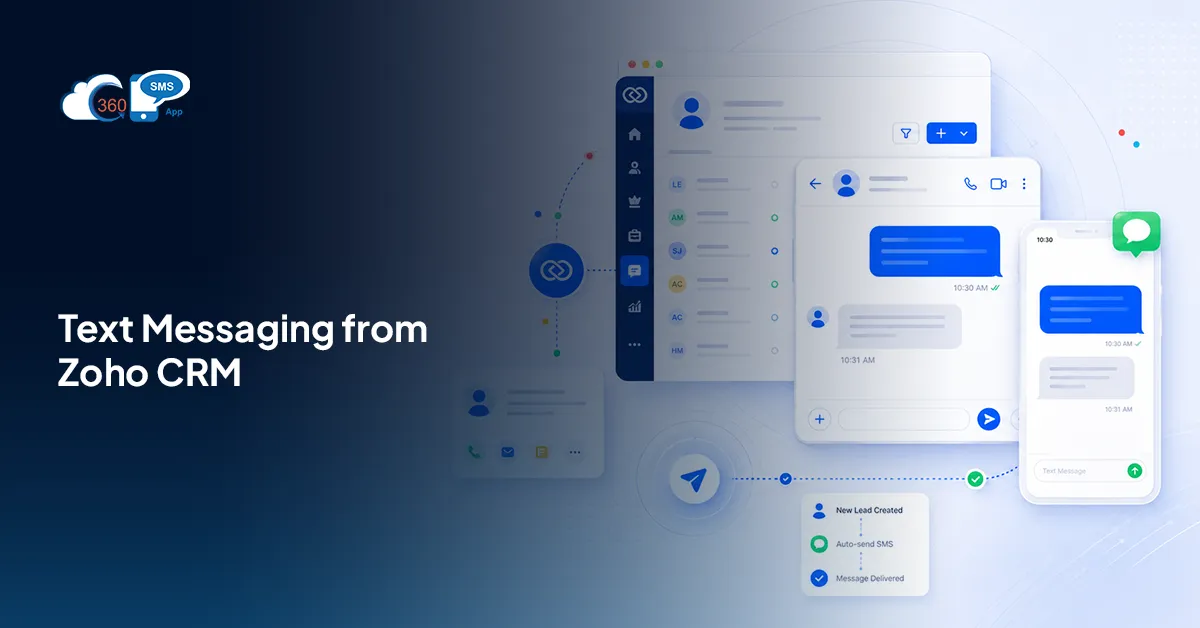
Yes. Through a connected app, sitting right inside contact and lead records.
Zoho doesn’t own a carrier relationship. No SMS gateway of its own, no phone network deal, nothing. What it built instead is an open framework, and third-party apps plug into that framework to do the actual sending. The app handles the text. Zoho just gives it a screen to live on.
Which changes how you should be thinking about this whole thing. You’re not picking “Zoho’s SMS feature” because that doesn’t exist. You’re picking an app that happens to live inside Zoho. Two very different decisions wearing the same outfit.
What Zoho Gives You Out of the Box
Nothing. Genuinely, zero Zoho CRM SMS capability ships by default.
What’s there instead: fields, modules, workflow logic, a marketplace stacked with apps ready to plug into those pieces. Zoho built the roads. Somebody else builds the cars that drive on them.
That’s exactly why most teams researching Zoho CRM texting install an app within the first week of asking the question. There’s no hidden “Send SMS” button waiting to be found in settings. You have to go add one, on purpose.
What an SMS App Actually Adds
Connect one, and here’s what shifts on your screen:
- Sending happens straight from a lead or contact record, no tab-switching, no second tool open in another window
- Replies land back on that record on their own
- Workflows fire messages without a human touching send (new lead arrives, text goes out)
- Bulk sends hit a filtered list view in one move
- WhatsApp runs in the same thread as SMS
That last one trips people up. Most reps assume WhatsApp needs its own login, its own tab. With a decent app like 360 SMS for Zoho, it doesn’t. One inbox. One record. Two channels, same window.
The One Thing That Catches People Out
Not every app behaves the same once it’s inside Zoho. Nobody warns you about this part.
Some redirect you. Click “send,” get bounced to an external portal in a new tab, compose the message somewhere else entirely, then wait and hope it syncs back to the record. It usually does. Eventually. With enough delay that you find yourself refreshing the page to check.
Others, 360 SMS app, keep everything inside the CRM screen itself. No redirect. No second login screen. No “did that actually go through” moment where you’re staring at a spinner. Same panel you’d use to log a call, type the message, hit send, done. Delivery status and read receipts show up right there on the record. Not tucked away in some dashboard you’ll forget exists by Thursday.
Sounds minor. Isn’t. Once your team is sending fifty messages a day, that gap becomes the difference between texting feeling like part of the job and texting feeling like the task everyone quietly avoids until the end of the day.
What Does It Cost to Start?
Two line items, not one. App subscription first. Per-message carrier cost second, since actual delivery still runs through telecom networks, no matter which app sits on top.
Exact numbers shift by app, volume, and whether you’re running SMS alone or SMS plus WhatsApp together. For complete clarity on pricing as per the requirement, it is advisable to connect with 360 SMS for Zoho experts.
How to Get Started in Just Four Steps
- Log in to Zoho CRM and install the extension — paste the install URL you’re given, check the required boxes on the details page, then pick which users or profiles get access and confirm
- Click “Set Up Zoho” and select your data centre
- Hit “Accept” to let the app read and write data in your Zoho account
- You’re in. Every component shows up on screen, and from there you can start building workflow rules for automation
Four clicks, roughly. No developer, no separate portal to bounce through. Once step four’s done, the messaging panel just sits there on your records, waiting for you to use it.
Wrapping Up
So, can Zoho CRM send text messages? Yes. Just not on its own.
That’s the whole point of this post, really. Zoho hands you the framework, the fields, the workflow logic. It doesn’t hand you a way to text anyone. A Zoho SMS app fills that gap, and which app you pick decides whether texting becomes something your team actually uses daily, or another tab everyone quietly stops opening by the second week.
Four steps to set up. No developer needed, no long onboarding call, nothing complicated hiding underneath. Worth trying before you write off texting from inside your CRM as more trouble than it’s worth.