


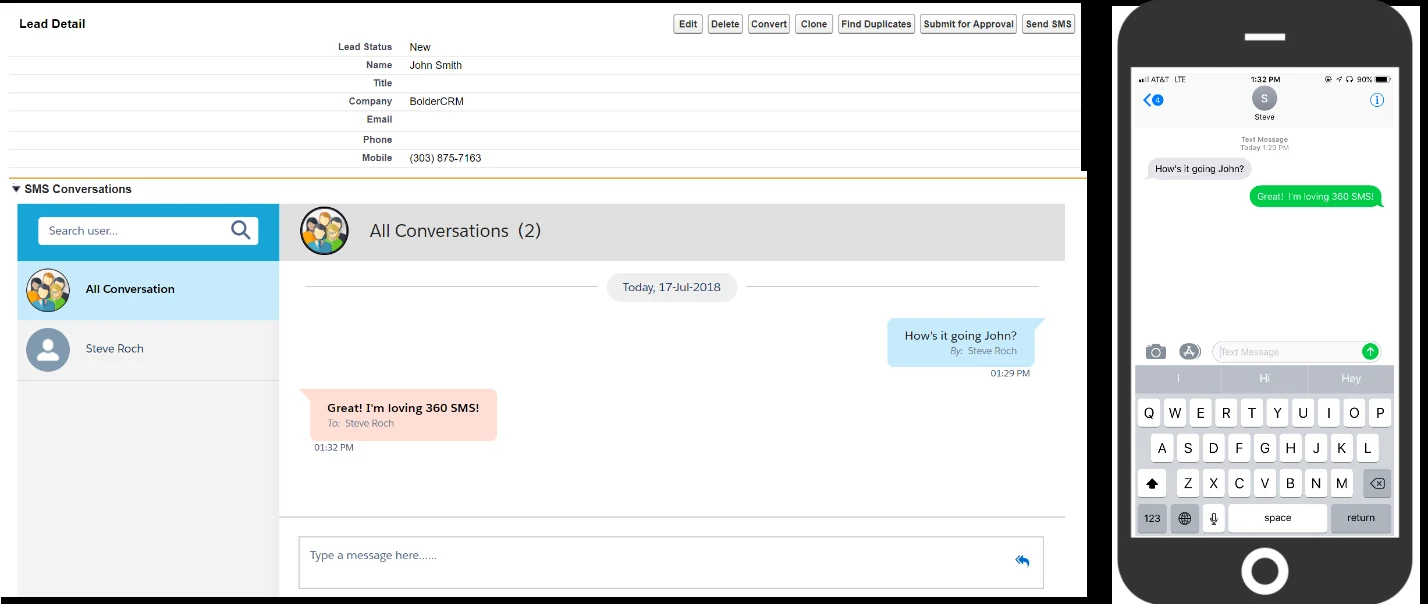
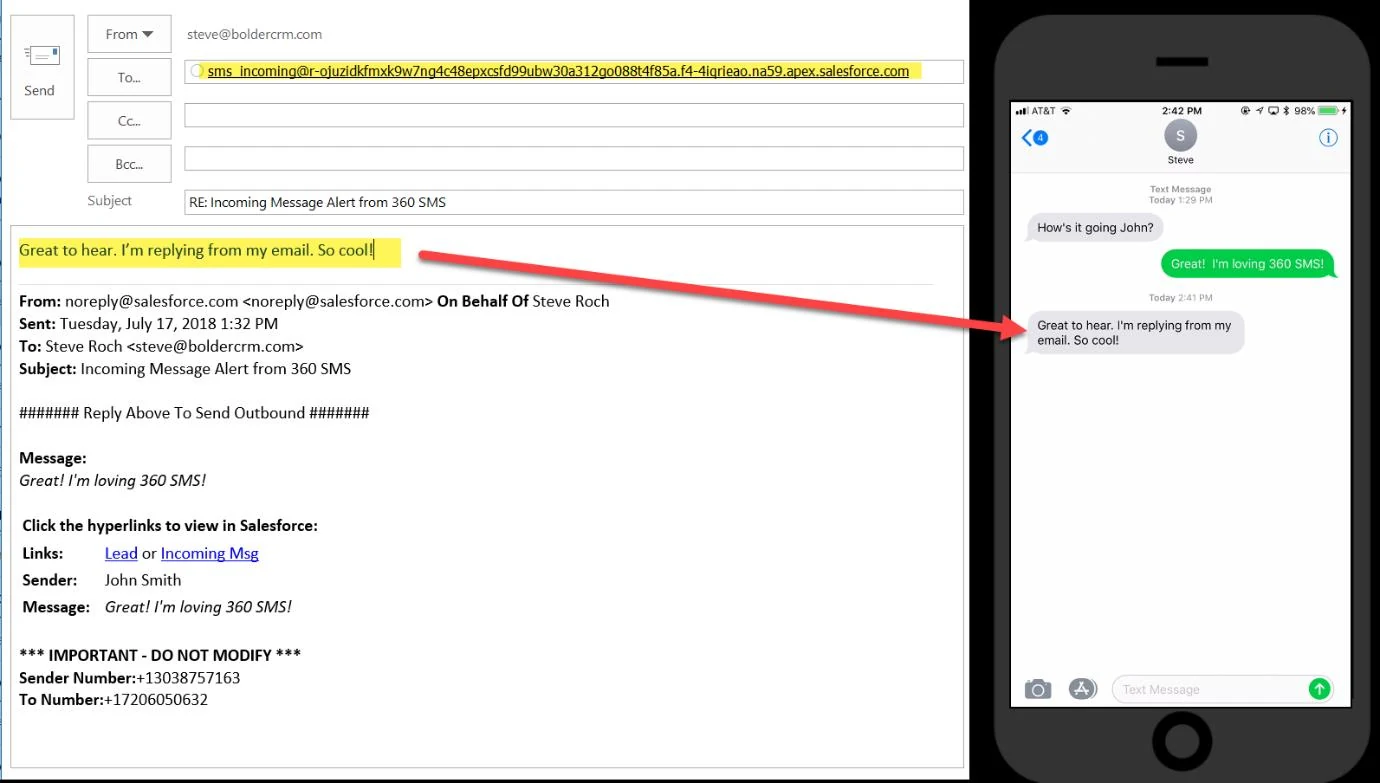
360 SMS provides the unique capability to REPLY to the Incoming SMS Notification email and have the text of that reply be sent as an Outbound SMS to the customer. This adds great value to users that may be on their phones and don’t want to use the Salesforce1 Mobile app to respond (even though the Incoming Notifications makes that extremely easy as well).
This section explains how to set-up the standard Salesforce Email Service that facilitates this feature.
Step 1: Create Email Service
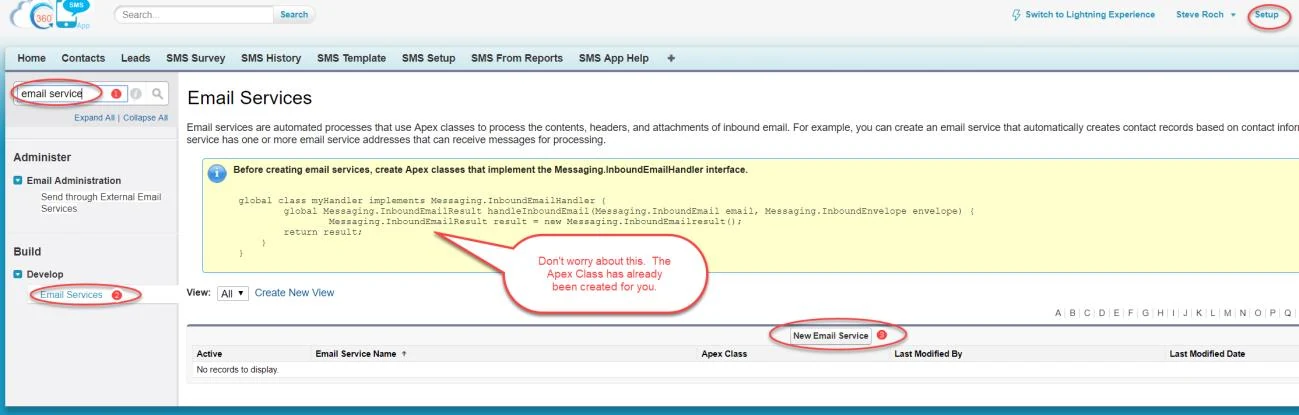
- Go to Salesforce setup
- Type ‘Email services’ in the ‘Quick Find’ box and Setup -> Develop -> Email Services.
- Click on ‘New Email Service’
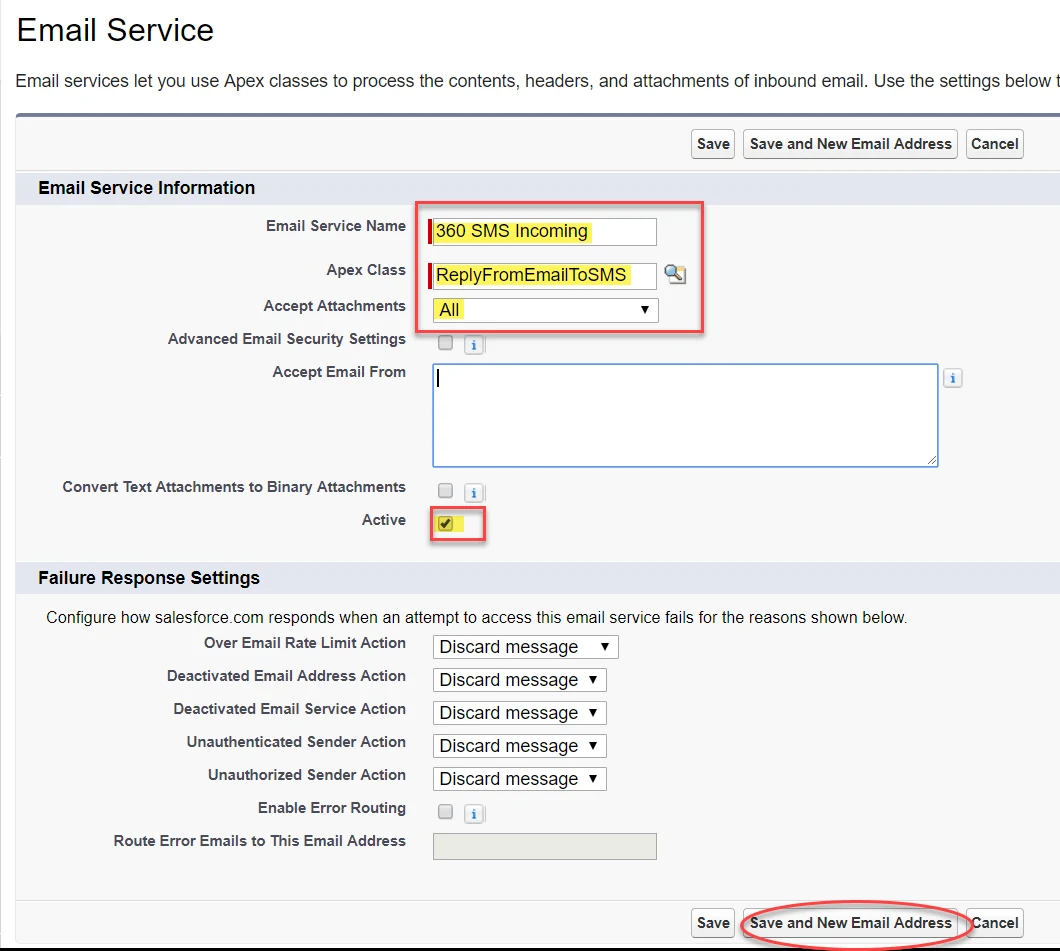
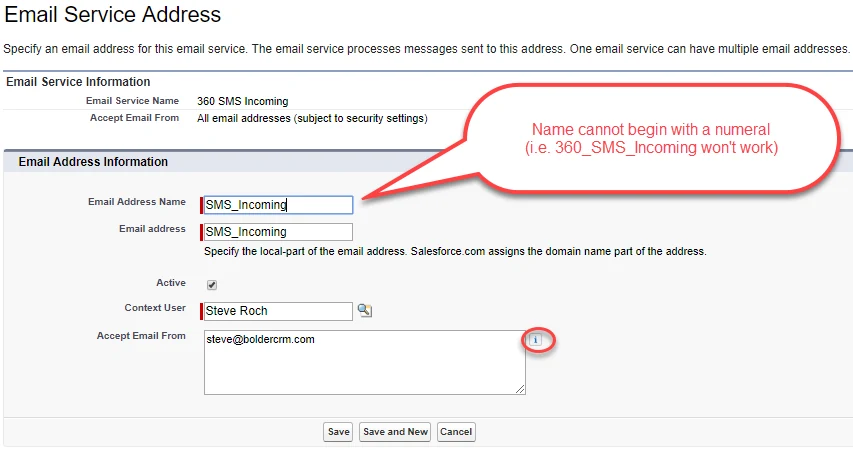
- Fill out the details as shown in the screen capture:
Email Service Name: 360 SMS Incoming
Apex class: ReplyFromEmailToSMS
Accept attachments: All
Active: True - Click on ‘Save and New Email Address’
- Now enter the following details and Save
Email Address Name: SMS_Incoming
Email Address: SMS_Incoming
Active: True
Context User : Usually an Admin or Service User
Accepted Email From: comma separated list of user emails
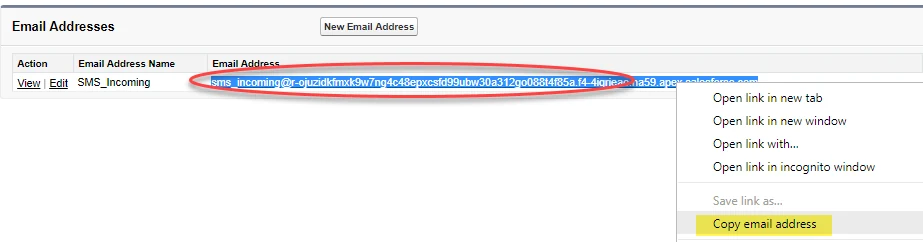
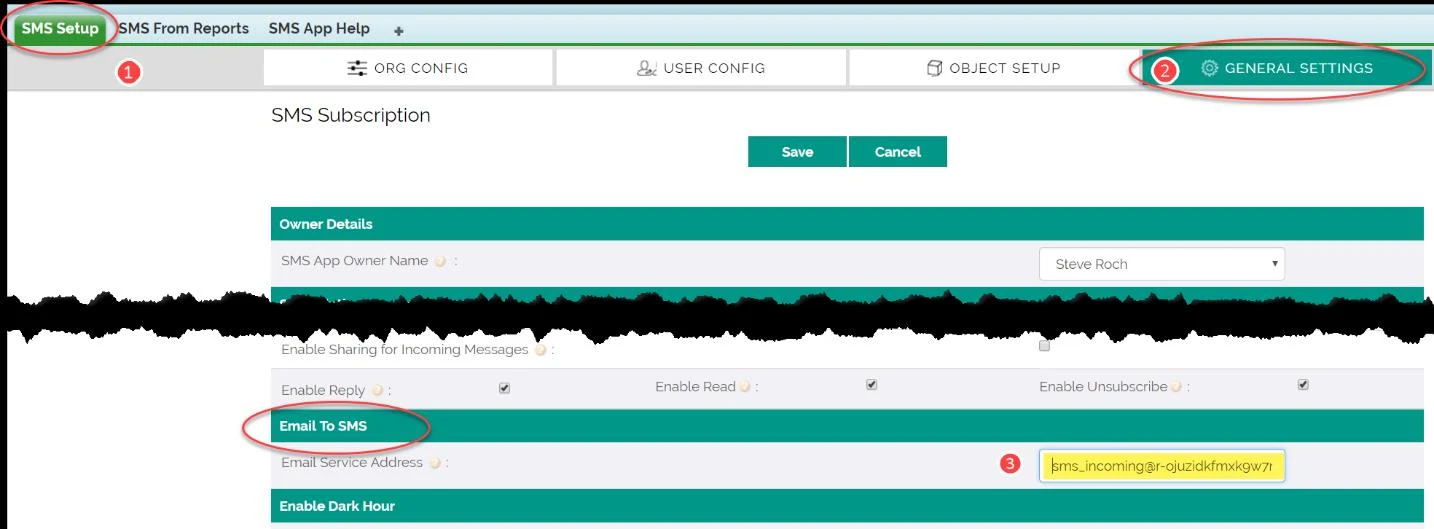
- Now, we must copy the email address generated in Step 6 to the 360SMS Set-Up
Step 2 (Optional): Edit Email Template
The 360 SMS Incoming Notifications uses standard Salesforce Email Templates that are installed with the product. You may optionally edit these templates for your own purposes.
IMPORTANT:
The algorithm to process the Reply Email message looks for two specific strings in the email (Sender Number: and To Number: ). Even though you may be tempted to change these, the labels and even the lack of space after the colons are important to parse out the messages. You also cannot use these labels (Sender Number & To Number) anywhere else in the HTML as these are used to find the key info after the colon.
Sender Number:+13038757163
To Number:+17206050632
To edit the template:
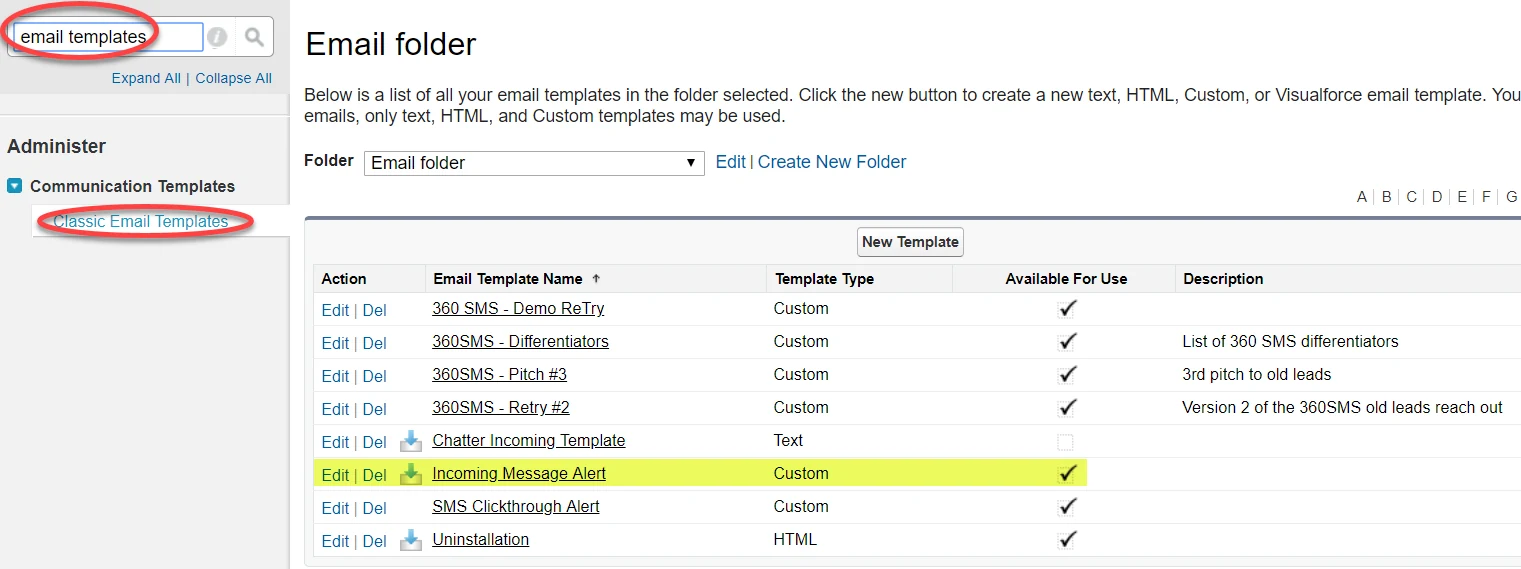
- Go to Salesforce Setup and type ‘Email Templates’ in the ‘Quick Find’ box.
- Navigate to the:
Administrator -> Communication Templates -> Email Templates - Edit the ‘Incoming Message Alert’ as desired, specifically the HTML version
- We suggest editing the Incoming Message Alert with the suggested code snippet we have provided. This has been modified to fit on a phone and has some fixes to the hyperlinks.
Recommended HTML Template
####### Reply Above To Send Outbound #######<br><br>
<b>Message:</b><br>
<i> {!tdc_tsw__Message__c.tdc_tsw__Message_Text_New__c}</i>
<br><br>
<table border="0">
<tr><td colspan="2"><b>Click the hyperlinks to view in Salesforce:<b></td></tr>
<tr><td valign="top"><b>Links:</b></td><td
valign="top">{!tdc_tsw__Message__c.tdc_tsw__Related_Object_Id_URL__c} or <a
href="https://login.salesforce.com/{!tdc_tsw__Message__c.Id}"  target="_blank">Incoming
Msg</a></td></tr>
<tr><td valign="top"><b>Sender:</b></td><td
valign="top">{!tdc_tsw__Message__c.tdc_tsw__Sender_Name__c}</td></tr>
<tr><td valign="top"><b>Message:</b></td><td
valign="top"><i>{!tdc_tsw__Message__c.tdc_tsw__Message_Text_New__c}</i></td></tr>
</table>
<br>
<b>*** IMPORTANT - DO NOT MODIFY ***</b><br>
<b>Sender Number:</b>{!tdc_tsw__Message__c.tdc_tsw__Sender_Number__c} <br>
<b>To Number:</b>{!tdc_tsw__Message__c.tdc_tsw__ToNumber__c}<br>
Out-of-Box Email Template (in case you need to revert back)
#################### Reply Above ####################<br><br>
Hello, <br><br>
You have received an incoming message. <br><br>
<i> {!tdc_tsw__Message__c.tdc_tsw__Message_Text_New__c}</i> <br><br>
To view the message, click
<a href="https://login.salesforce.com/{!tdc_tsw__Message__c.Id}"
target="_blank">Here</a><br><br>
To view associated record, click
<a
href="https://login.salesforce.com/{!tdc_tsw__Message__c.tdc_tsw__Related_Obj
ect_Id__c}" target="_blank">Here</a><br><br>
<b>More Details:</b> <br>
<b>Sender Name:</b>{!tdc_tsw__Message__c.tdc_tsw__Sender_Name__c}   <br>
<b>Sender Number:</b>{!tdc_tsw__Message__c.tdc_tsw__Sender_Number__c} <br>
<b>To Number:</b>{!tdc_tsw__Message__c.tdc_tsw__ToNumber__c}<br><br><br>
Thanks , <br><br>
360 SMS App for Salesforce <br><br>