












 Listen to this article
If you’ve ever tried reaching hundreds—or thousands—of customers one message at a time, you already know the pain. In my experience, manual messaging feels a bit like knocking on doors in a huge apartment complex… one by one. It’s slow, tiring, and honestly not scalable. This is exactly where the need to send bulk SMS from Salesforce comes in. Bulk messaging solves the problem of speed, reach, and consistency, without losing the personal touch you want your customers to feel. When done right, it lets you talk to the right people, at the right time, with far less effort than you’d expect.
Table of Contents
What Is Salesforce Bulk SMS & Bulk Text Messaging?
The concept of Salesforce bulk SMS or text messaging is about sending one message to many people directly from Salesforce. The best part here is that when you send bulk text messages from Salesforce, you’re using the data you already trust—Leads, Contacts, Campaign Members, or even custom objects—to reach people in one go.
You can tailor every message by adding names, appointment dates, order numbers, etc, using merge fields and avoid sending the same generic text to everyone. From your side, it’s one action, but your customers feel like a one-on-one message.
Teams can easily share reminders, promotions, service alerts, and even internal updates at scale. And once they try it, going back to manual texting feels outdated.
Salesforce Bulk SMS vs Bulk MMS Messaging
This question comes up a lot: SMS or MMS—what’s better?
When your scalable SMS messaging does not need any images, videos, or documents, Salesforce bulk SMS is your best pick. You can send appointment reminders, payment alerts, or simple updates reliably, as it’s fast, affordable, and works on a basic phone.
On the other hand, you can add images, GIFs, or even short videos with bulk MMS. It’s perfect to add visual appeal and make messages more engaging. However, it can increase your costs and may not support every use case.
Here’s how I usually explain it:
- If reliability and speed are your focus, then you can go with SMS.
- If your message needs attention—like a product launch or event invite—MMS might be worth it.
Most Salesforce bulk SMS apps support both, so you’re not locked into one choice. You just pick what fits your message.
How to Send Bulk Text Messages from Salesforce (Step-by-Step Guide)
After understanding the importance of bulk messenger, it’s obvious to find out how to send bulk text messages from Salesforce. Once the app is installed, the process is pretty simple. I’ll walk you through some steps while using a bulk SMS solution. There are chances that exact button names might vary slightly between apps, but somewhat the process stays the same
Step 1: Install a Salesforce Bulk Messaging App: First things first, you need an app from the Salesforce AppExchange. Think of it like downloading an app on your phone. Search for “bulk SMS” or “SMS for Salesforce,” choose one that fits your needs (more on this later!), and install it into your Salesforce org. This typically involves a few clicks and setting up permissions.
Step 2: Define Your Audience: Segment your audiences that you want to target. You can choose List Views to create customizable lists, campaigns to target specific campaign members, or reports to target millions. Choose the method as per your target audience.
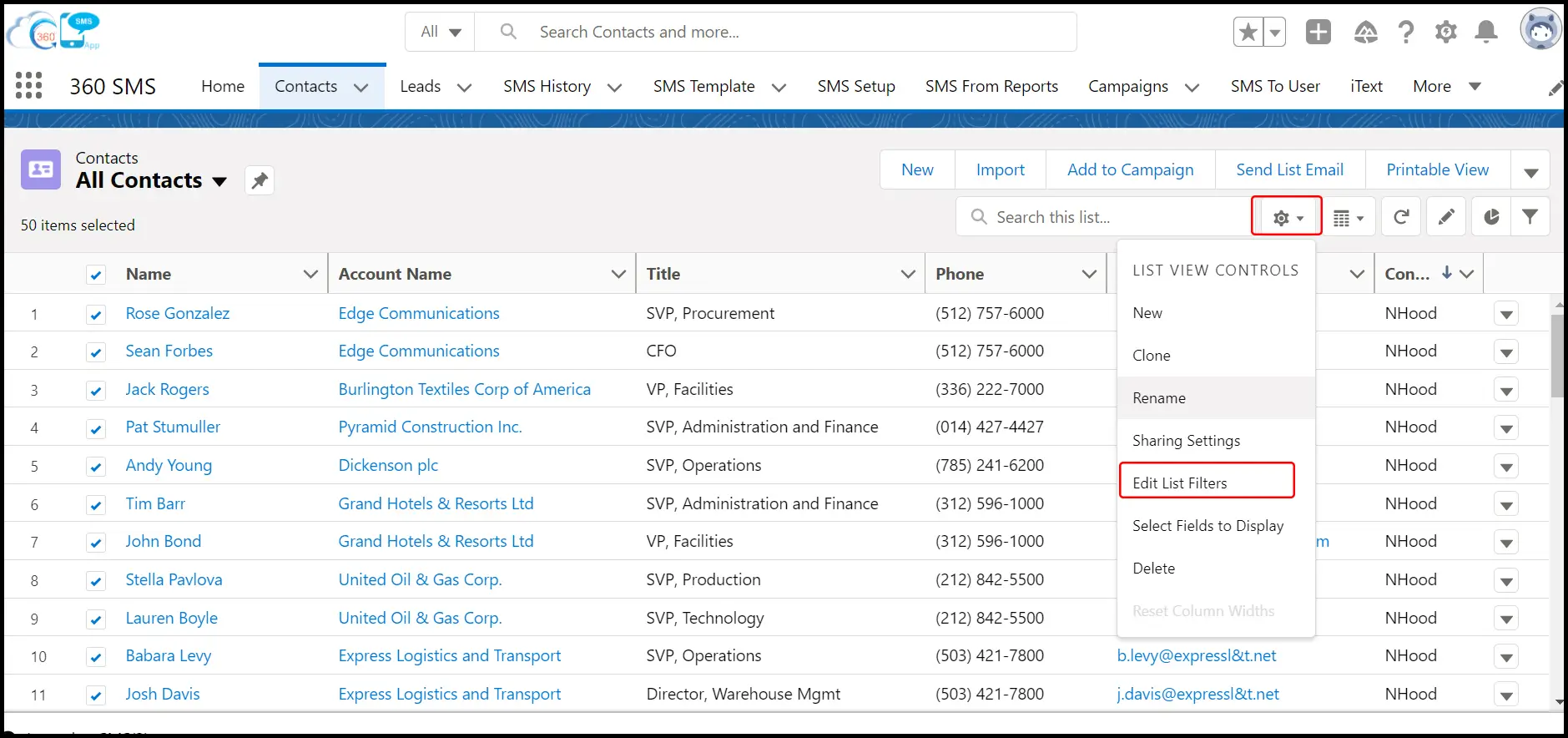
Step 3: Craft Your Message: This is where you draft your message regarding what you want to communicate.
- Message Box: You’ll see a text area where you type your message.
- Merge Fields: Insert a Merge Field to personalize bulk messages. This allows you to pull data directly from your Salesforce records. So, instead of “Hi there,” you can select {!Contact.FirstName} or {!Lead.FirstName} to make it “Hi John” or “Hi Sarah.” You can also include custom fields, like {!Opportunity.Amount} or {!Account.Industry}.
- Templates: With the advanced bulk texting app, you can use pre-built templates for faster messaging. This means you write a common message once and forget it. (e.g., “Welcome to our service, {!FirstName}!”) and reuse it instantly, saving you tons of time.
- Select channel: If you want to send an image or video, look for an “Attach Media” or “Send MMS” checkbox and upload your file. Apart from this, if the app supports multichannel messaging, you can select the preferred channel of your audience for more effective bulk messaging.
- Choose “To” and ‘From’ Number: Select numbers from which you want to send the messages. Also, select the ‘To’ number of the recipient if multiple numbers exist.

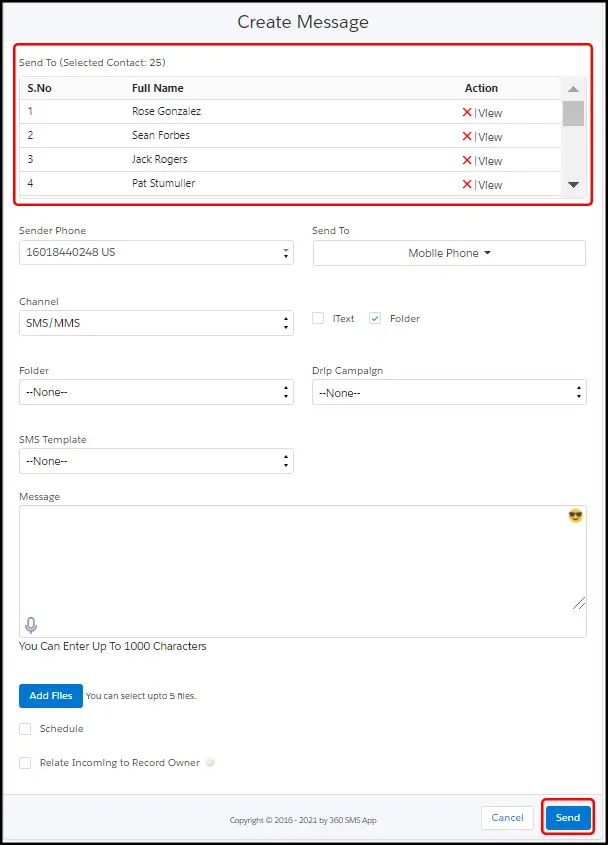
Step 4: Check and Send/Schedule: Always review your message before you hit the “Send” button. Look for typos, added merge fields, and the recipient contact number.
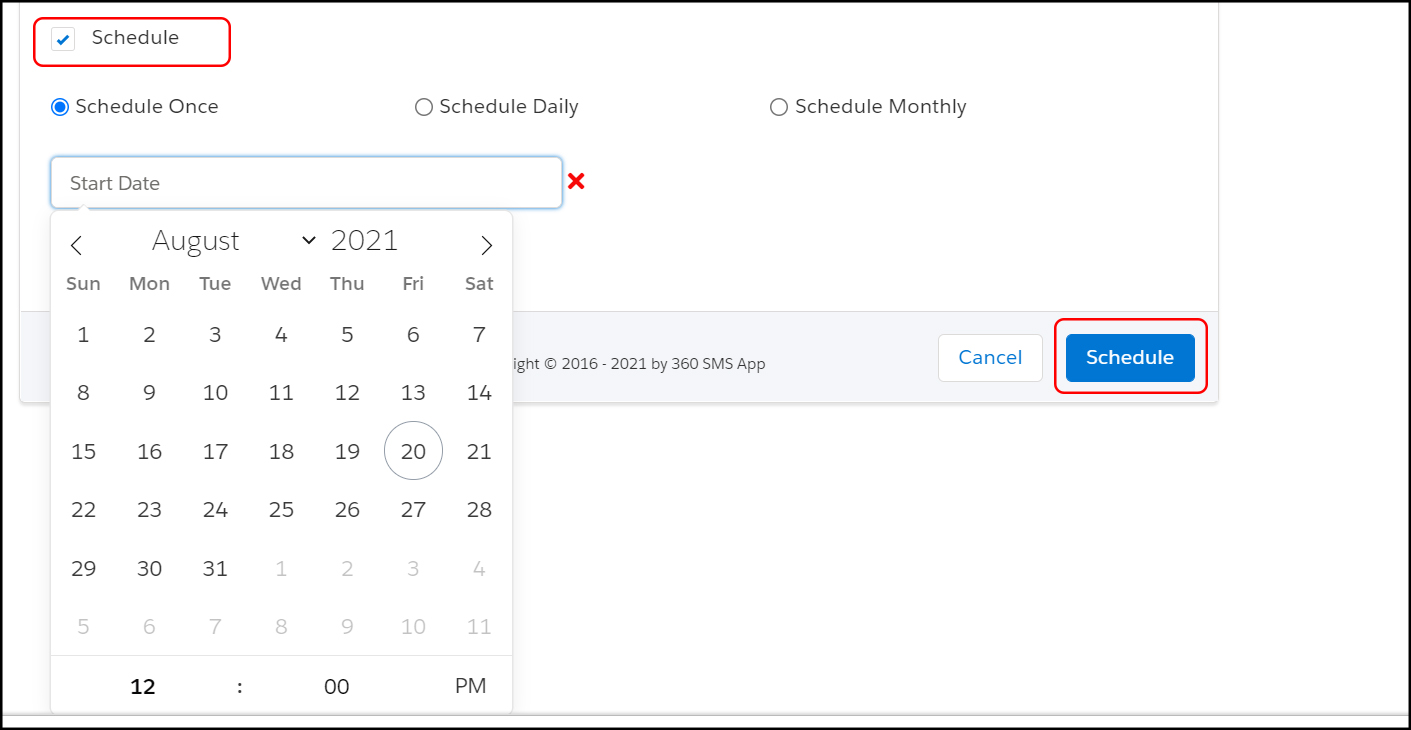
Step 5: Send and Monitor: After sending bulk messages, the work doesn’t end here. Monitor the status of your bulk send—how many were delivered, how many failed, and how many replies you received.
Best Way to Send Bulk SMS from Salesforce for Businesses
Talking about the “best way” to send bulk SMS from Salesforce for businesses, one approach doesn’t work for all. However, I can share some proven tactics that add great value to business, focusing on effectiveness, personalization, and compliance.
- Leverage Your Data (Segmentation is King!): The single best way is to not treat all your customers the same. Salesforce is a goldmine of information. Use it!
- Example: Don’t send a generic “20% off everything” message to everyone. Instead, segment your audience. A message like “20% off pet supplies” for customers who have previously bought pet products will work better. An exclusive discount on luxury items is another message that can be sent to your high-value customers. This drastically increases relevance and response rates. You can do this by creating specific Salesforce reports or list views that filter your audience.
- Personalize: We cannot ignore the importance of Merge Fields while sending messages in bulk. A text starting with a name feels much more personal than “Dear Customer.”
- Real-world scenario: A real estate agent could send “Hi! {Contact.FirstName}, I found a new listing in {!Contact.PreferredNeighborhood} that matches your criteria. Take a look: [link].” This hyper-personalization transforms bulk message sending into a tailored communication.
- Automate Smartly (But Don’t Overdo It): While manual sends are great, the true power of Salesforce bulk message sending comes from automation.
- Example: One can send “Welcome to the club!” SMS to a new customer the moment their status changes in Salesforce with the help of Flows, or a “Happy Birthday, {!FirstName}!” message on their special day. This ensures timely, consistent communication without manual effort.
- Opt-In and Opt-Out Management is Non-Negotiable: This isn’t just a “best practice”; it’s a legal requirement in many regions.
- Ensure your chosen Salesforce bulk SMS app automatically handles opt-outs. If someone replies “STOP,” the system should mark them as unsubscribed and prevent future bulk messages. Always make it clear how people can opt out (e.g., “Reply STOP to unsubscribe”). This protects your business and respects your customers’ privacy.
- Track and Analyze: The best way to send bulk SMS is to learn from your sends.
- Look at: Delivery rates, open rates (if you include links), and most importantly, response rates. Are certain types of messages performing better? Are texts sent at specific times getting more engagement? Use Salesforce reports to track these metrics and refine your strategy. You can even see which campaign members are interacting the most.
By combining the power of your Salesforce data with a smart, compliant bulk SMS strategy, you can achieve incredible results that simply aren’t possible with generic, un-personalized mass texting tools.
What Is a Salesforce Bulk SMS App & How Does It Work?
A Salesforce bulk SMS app is basically the solution that enables bulk message sending using data from your Salesforce CRM.
Here’s how it usually works behind the scenes—without the technical headache:
You select your audiences using List views, campaigns, or reports. You write one message. The app then sends that message individually to each phone number using telecom networks, while handling delivery, retries, and failures automatically.
From your side, it feels simple. Click, send, done.
What makes a good bulk SMS app powerful is what happens after the send. Replies come back into the system. Delivery statuses get tracked. Opt-outs are recorded. Everything stays organized, so you’re not guessing what worked and what didn’t.
In short, the app does the heavy lifting so you don’t have to babysit messages all day.

Best Salesforce Bulk Texting Apps & Platforms for Sending Bulk SMS
Choosing the right tool for bulk messaging is like picking a co-pilot for your business. You want something that’s reliable, easy to talk to, and—most importantly—won’t get you lost (or blocked by carriers) when you’re trying to reach a massive audience.
While many apps claim to do “bulk,” the way they handle thousands of messages at once varies wildly. Here are the five most popular options you’ll find in the Salesforce ecosystem, starting with the one that truly sets the bar.
1. 360 SMS: The High-Volume Heavyweight
If you want to move from “sending some texts” to running a “messaging powerhouse,” 360 SMS is the clear leader. It’s built entirely inside Salesforce (100% native), meaning your data never leaves your CRM, and it’s specifically engineered to break the usual limits of bulk sending.
- The “Report-to-Text” Game Changer: While most apps limit you to small List Views, 360 SMS lets you trigger mass messages directly from a Salesforce Report. Whether you have 5,000 or 50,00,000 records, you can reach them all in a few clicks.
- Intelligent Batching: It doesn’t just “blast” and hope for the best. You can filter audiences by keywords in responses and segment your audiences smartly for effective campaign management and better ROI.
- One-Stop Shop: Beyond standard SMS, it gives you WhatsApp, Facebook, Ringless Voicemail, and 11+ channels all managed from a single, unified inbox.
2. SMS-Magic (Conversive)
One of the most established names on the AppExchange, SMS-Magic is often the choice for large enterprises that prioritize complex, multi-platform conversations.
It’s great for high-touch industries like Healthcare or Finance, where compliance and detailed “paper trails” are everything.
While it’s powerful for 1-on-1 customer service, the setup can feel a bit more “enterprise-heavy” compared to more modern, point-and-click tools. It’s a solid choice if you need your messaging to sync across multiple different CRMs (like Salesforce and Zoho simultaneously).
3. Mogli SMS
Mogli is a favorite in the Nonprofit and Education sectors because it’s straightforward and plays very nicely with Salesforce Flow.
It’s the “user-friendly” choice. If you’re a Salesforce Admin who loves building automated workflows without code, Mogli will feel very familiar.
For bulk messaging, Mogli has a cap (typically around 25,000 to 50,000 per send, depending on the method). It’s perfect for schools sending out campus alerts, but might feel restrictive for a massive retail brand looking to blast millions of customers.
4. Sinch Engage (formerly Mercury SMS)
Sinch is a global giant in the communications world, and its Salesforce integration reflects that international reach.
Since they own their own carrier network, their “deliverability” is good. They are the “direct line” to the phone companies.
Their tool is a great “plug-and-play” option for businesses that need to send international bulk messages reliably. However, because they are a global provider, the interface can sometimes feel like a separate platform being pulled into Salesforce rather than a fully “native” experience.
5. Blackthorn Messaging
If you’re already using Blackthorn for Events or Payments, their messaging app is a “no-brainer” addition to your stack.
It’s incredibly niche-focused. It’s the king of transactional bulk SMS—like texting 500 event attendees a last-minute room change or sending payment reminders to a list of overdue invoices.
While it’s sleek and fast, it lacks the deep “360-degree” marketing features (like AI-driven chatbots or massive report-based sends) that you’d find in a more comprehensive tool like 360 SMS.
If you are sending small batches or have a very specific niche (like events), the other apps on this list are fantastic. But if you’re looking to scale your business and want the most powerful bulk messaging capabilities—the kind that can handle millions of messages directly from your reports without breaking a sweat—360 SMS is the undisputed gold standard.
Key Features to Look for in the Best Bulk SMS Apps
When you’re shopping for a bulk SMS tool, it’s easy to get blinded by flashy buttons. But if you want a workhorse that won’t let you down, keep an eye out for these “must-haves”:
- Native Integration: This is huge. You want an app that lives inside your CRM (like Salesforce). If you have to export data to a third-party site just to send a text, you’re asking for a data security headache.
- The “Report-to-Text” Power: Most apps can send from a list, but the best ones (like 360 SMS) let you send directly from a Salesforce Report. This means if you can report on it, you can text it—even if there are millions of records.
- Automated Opt-Out Management: You shouldn’t have to manually check who said “STOP.” Your app should handle that “handshake” automatically so you never accidentally text someone who unsubscribed.
- Multi-Channel Support: These days, customers are available on different channels. futuristic approach, look for a multichannel bulk Messaging app that lets you switch between different channels as per your customers’ preferences.

Bulk SMS Use Cases Across Industries
Bulk messaging isn’t just for “big sales.” Let’s find out how it is used across industries.
- Healthcare: Appointment reminders and confirmations, health tips, medication refill reminders, and test results are shared by Professionals in Healthcare using mass texting.
- Education: Campus alerts, fee reminders, class updates, deadlines, and emergency notifications are some use cases of bulk messaging for Schools, colleges, and Universities.
- Real Estate: Realtors share new listings, open house reminders, follow-ups, invites, meeting confirmations, virtual property tours, and more with bulk SMS.
- Finance & Insurance: Payment reminders, policy updates, renewal alerts, loan offers, policy changes, etc., are communicated through bulk texting by the finance industry.
How to Choose the Right Bulk SMS Sending App
The parameters to judge an app as ‘right’ differ for every business according to their use cases and requirements. Some need a scalable solution, while some look for ease of use. Let’s talk about some must-haves that can make any work messaging solution apt for any kind of business.
- Does it scale? The scalability of your app is reflected when you try to send thousands of messages at once. When a business grows, the app should too to handle the outreach and other efforts at scale.
- Is it “Zero-Code”? You’re a business person, not a developer. You should be able to set up a drip campaign or a bulk blast with points and clicks, not lines of code.
- How is the support? SMS regulations (like 10DLC in the US) are confusing. You want a partner who will help you get registered and stay compliant, not just a software link.
Common Mistakes to Avoid in Bulk SMS Messaging
Despite a well-planned and drafted messaging campaign, certain mistakes can push all your efforts in vain. So here’s what you should avoid:
- The “Midnight Blast”: Sending a bulk message without checking the recipient’s timezone. Nothing kills a brand’s vibe like a promotional text at 3:00 AM!
- The “Wall of Text”: SMS is for “Short” Message Service. Long messages might scare your readers, and they can leave even before reading. So keep it short and punchy.
- Missing the CTA: Never send a message without a “What’s Next?” Whether it’s “Reply YES” or “Click here,” give them a clear path to take.
- The “Broken Merge Field”: We’ve all seen it—getting a text that says, “Hi {!FirstName}, we have a deal for you!” Inaccuracy in data or misspelling a tag can hamper your strategies to send personalized messages. Always send a test text to yourself first to ensure that the intended field actually appears.
- No clear “Opt-Out” Instructions: Legally, people should know how to opt out of messages effortlessly. Messages that do not contain a clear opt-out instruction like “Reply STOP to opt out” look pushy, and the number can end up getting blocked.
- Too Much Texting is a Big No: Excess of everything is harmful, and so is texting. Sending out messages in bulk to your audiences daily can annoy them, and they can lose interest in your messages and block you.
- One-way messaging set up: If you’re using a “No-Reply” setup for bulk SMS, you’re missing out on huge opportunities. Even for bulk sends, have a plan (or an automated bot) to handle the people who text back with questions.
Final Verdict: Is Bulk SMS Right for Your Business?
If you’re still on the fence, look at the math: other communication channels do not give you the open rate that SMS gives- 98%. If your business relies on people actually seeing what you send—whether that’s a flash sale, a reminder, or a shift opening—then bulk SMS isn’t just “right,” it’s essential. It turns your database from a static list of names into a living, breathing conversation. With a reliable bulk messaging solution, you can send bulk SMS and connect with your customers reliably at scale, ensuring your communication receives the attention it deserves. In return, it helps you drive more engagement, leads, and easy conversions.
Ready to strengthen your engagement strategies with AI and the best bulk texting app?
CEO Siddharth Sehgal is CEO & Salesforce Communication Guru. He helps businesses grow exponentially by putting their Salesforce CRM on steroids with his unique techniques. He is on a mission to help businesses build deeper relationships with their customers.

Siddharth Sehgal
Questions? We’ve Got Answers
Recent Blogs
7 Ways Schools Use Salesforce SMS for Communication
Listen to this article If you’ve ever been on the administrative side of a school, you probably know this already—communication…


Zoho WhatsApp Automation Using Workflows
Listen to this article You probably know this feeling. A lead comes in, you think, “I’ll reply in a bit,”…
AI-Powered Conversations in Zoho Chatbot
Listen to this article Every business hits a point where customer messages start piling up faster than your team can…