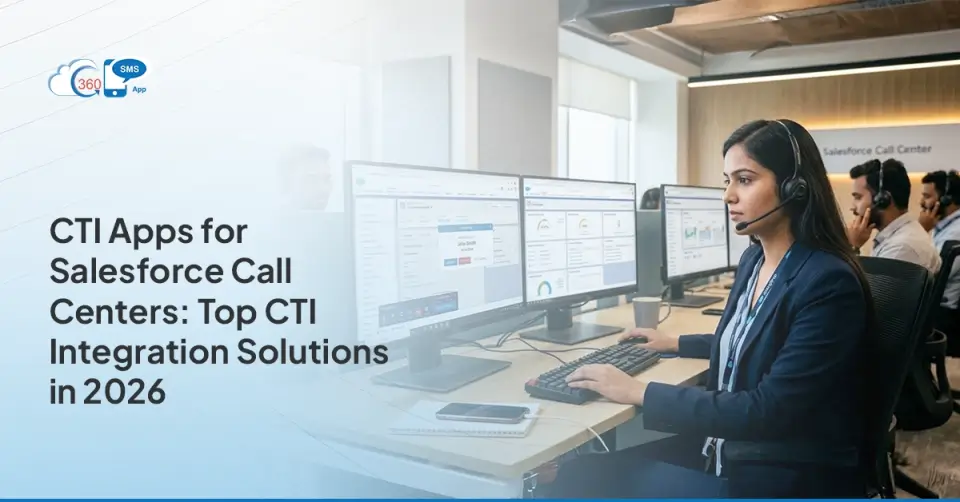
As customers expect better service, call centers need to handle calls more quickly, with more personalization, and with as little effort as possible. That’s why an advanced Computer Telephony Integration (CTI) is required for successful call center integration with Salesforce.
Salesforce CRM Call Center operations. When integrating voice systems with Salesforce using CTI, agents can get conversation context, have more advanced call management tools, and use automation.
Yet with numerous CTI choices out there in 2026, which one should you choose for your business? This blog post looks at the CTI tools for integrating with Salesforce Call Center.
It highlights what they do well and why 360 CTI stands out from the rest. Let’s explore CTI tools for Salesforce Call Center Integration.
What Are CTI Apps for Salesforce Call Centers?
Let’s keep this simple.
CTI Apps are tools that connect your phone system to your CRM so you can make and manage calls directly inside your workspace. In a typical CTI call center, these apps allow your agents to call customers, see caller information instantly, and log call details without switching between platforms.
Think of it like this: imagine answering a call and immediately seeing the customer’s history, previous conversations, purchases, complaints, everything. No searching. No, asking the customer to repeat their story again.
That’s what a good CTI system does.
When you use CTI Apps, they merge into one interface. Your agent sees a “softphone” right inside the Salesforce screen. They don’t even have to pick up a physical handset to manage call operations
Table of Contents
How CTI Integration with Salesforce Works
You might think you need a degree in rocket science to set this up, but it’s actually quite logical. Most modern solutions use something called “Open CTI.” Imagine this as a universal translator that Salesforce provides. It allows third-party phone systems to “plug in” to the browser without you having to install heavy software on every single laptop in the office.
When a call travels through the web to your agent, the CTI integration with Salesforce catches the incoming phone number. It quickly scans your database—faster than you can blink—and says, “Hey, that’s Sarah from Chicago!” It then pulls Sarah’s profile onto the screen before the agent even says hello.
In 2026, AI technology has reached a point where it can generate and analyze transcripts and provide responses to the person handling the call. It’s similar to having a small expert advisor giving you guidance right as you’re on call.
Benefits of CTI Apps for Salesforce Call Centres
Why bother with all this? Well, if you’ve ever sat in a CTI call center, you know that seconds matter. Here’s why this tech is a game-changer for your business:
- Happy Agents, Happy Life: Nobody likes doing “busy work.” When the system logs the call duration and the caller’s name automatically, your agents can actually focus on the human on the other end.
- Humanized Touch: Don’t you think it would be good if someone calls and your agents say, “Hello, I see you’re calling about the order you placed yesterday.” This kind of interaction feels almost magical. It instantly makes the caller feel like they can trust the company.
- No More Data Ghosting: We’ve all been there—an agent forgets to log a call because they got busy. With the best CTI for Salesforce setup, the system does it for them. No more missing data “ghosts” haunting your reports.
- Lower Costs: It sounds counterintuitive to buy more software to save money, but when your agents handle calls 20% faster because they aren’t clicking between ten different tabs, you need fewer people to handle the same volume.
Best CTI Apps for Salesforce in 2025
1. 360 CTI – The AI-Powered Salesforce Native CTI
360 CTI is noted for being a fast, smart, and dependable Salesforce CTI designed just for this purpose. Designed but not limited to Salesforce Call Center Integration, 360 CTI enables streamlined call flows, agent productivity, and personalized customer interactions—all without leaving the CRM.
Why It Leads:
AI-Powered Call Insights allow agents to understand the caller’s tone and sentiments.
Having Sticky Agent helps callers reach the same agent every time, which builds trust and keeps conversations consistent.
With Call Barging, Monitoring, and Whispering, supervisors can help agents in real time.
Call automation and routing send incoming calls to the right agent or department in the event of incoming calls.
Proper agent availability management allows calls to be routed quickly according to current status.
Seamless automation for Salesforce CRM Call Center workflows.
With deep integration, minimal setup time, and mobile compatibility, 360 CTI is the top choice for organizations looking to modernize their Salesforce Call Center Management.
2. Amazon Connect CTI Adapter for Salesforce
Amazon Connect provides a scalable, cloud-based contact center solution with a Salesforce CTI adapter. It enables real-time call control, instant customer record pop-ups, and intelligent contact routing within Salesforce, enhancing agent efficiency and streamlining call center operations for improved customer engagement and service delivery.
Key Features:
Natural language support via Amazon Lex.
Embedded contact controls.
Dynamic queue routing for large call volumes.
If we talk about 360 CTI capabilities in comparison to Amazon Connect, a lot of customization is needed to achieve what 360 SMS offers.
3. Genesys Cloud CX for Salesforce
Genesys Cloud CX delivers omnichannel customer engagement with a Salesforce CTI connector for voice. It enhances Salesforce CRM Call Center operations by enabling predictive routing, call automation, advanced call routing, and agent availability management, ensuring efficient handling of interactions and improved customer experiences across multiple communication channels.
Highlights:
Visual dashboard for queue monitoring.
Real-time and historical analytics.
Omnichannel capabilities.
Though feature-rich, integration complexity and licensing costs can be hurdles for smaller call centers.
4. RingCentral for Salesforce
RingCentral’s CTI app enables users to make and receive calls in Salesforce, auto-log interactions, access real-time customer records, manage agent availability, automate routine call workflows, and apply basic call routing for smoother operations. It helps streamline call center tasks and ensures agents handle customer interactions more efficiently within the CRM.
Benefits:
Easy-to-use interface.
Auto-logging and click-to-dial.
Call notes and disposition logging.
While it serves small to mid-sized teams well, RingCentral may lack the AI-driven enhancements and advanced routing capabilities of 360 CTI.
5. Five9 CTI for Salesforce
Five9’s CTI solution offers a robust Salesforce integration designed for enterprises, supporting predictive dialing, advanced agent performance monitoring, real-time analytics, and intelligent call routing. It enables large teams to manage high call volumes efficiently, automate workflows, and gain insights into agent productivity for improved customer service and operational performance.
Strengths:
Intelligent omnichannel routing.
AI and speech analytics for larger teams.
CRM record pop-ups for live agents.
Best suited for enterprises, but smaller teams might find it more complex than necessary when it comes to Salesforce Call Center Management.
6. Vonage Contact Center for Salesforce
Vonage provides seamless Salesforce integration for voice and messaging, focusing on delivering high-quality calls and an intuitive user experience. Its CTI solution enables real-time dashboards, efficient call handling, workflow automation, and agent performance tracking within Salesforce. This makes it a solid option for teams prioritizing clarity, usability, and streamlined communication processes.
Features:
Real-time dashboards.
Agent performance tracking.
Workflow integration with Salesforce.
Ideal for teams needing unified communications, but lacks the advanced AI analysis offered by 360 CTI.
7. NICE CXone for Salesforce
NICE CXone offers advanced workforce management and voice analytics fully integrated with Salesforce. It supports blended communication channels, enabling seamless interactions across voice, chat, and email. With comprehensive reporting and AI-powered insights, it helps optimize agent performance, improve customer experience, and drive efficient call center operations within Salesforce environments.
Pros:
Smart agent routing.
Post-call analytics.
AI virtual assistants.
A strong solution for analytics-driven organizations, though more resource-intensive to implement.
Key Features to Look for in the Best CTI for Salesforce
If you’re shopping around in 2026, don’t just settle for “it makes calls.” You want the fancy stuff that actually makes life easier. Look for these:
- AI voice Bots: This is something one can’t miss when AI is riding the wave. This is one of the most powerful automations in the calling space where AI can handle calls, converse, book demos, and more.
- Click-to-Dial: Your agents should never have to manually type a phone number again. They see a number in Salesforce, they click it, and it dials. Simple.
- AI Transcription: This is the “new cool.” The app should be able to turn the spoken words into text notes automatically. It may even flag if a customer sounds angry so a manager can jump in to help.
- Power Dialers: For your sales team, this is like a treadmill for calls. It automatically dials the next person on the list as soon as the previous call ends.
- Omnichannel Support: In 2026, people don’t just call. They text, they WhatsApp, they video chat. Your CTI Salesforce integration should handle all of that in one place.
CTI Apps Use Cases in Salesforce Call Centres
How does this look in the real world? Let’s look at “Fast-Track Furniture,” a fictional company that was struggling. Their support reps were overwhelmed, and customers were waiting 10 minutes just to get an update on a sofa delivery.
Once they implemented a solid CTI Salesforce integration like 360 CTI, things changed. Now, when a customer calls, the rep sees the “Sofa Order” pop up instantly. They can say, “I see your sofa is on the delivery truck right now!” and hang up in 2 minutes. In the sales department, their reps used the “Power Dialer” feature to reach twice as many leads per day. Their revenue didn’t just go up; it skyrocketed because they weren’t wasting time on the “admin” of dialing.
How to Choose the Best CTI App for Salesforce
Picking the right one is like picking a car. You need to know what you’re using it for.
- Check the “Native” Status: Some apps are “Salesforce Native,” meaning they were built inside Salesforce. These are usually easier to manage because they live where your data lives. 360 CTI is a great example of this.
- Scale Matters: If you have 5 agents, you don’t need an enterprise-grade system that costs a fortune. But if you have 500, you need something that won’t crash when everyone hits the phones at 9 AM.
- Read the Reviews: Don’t just trust the marketing. Go to the AppExchange and see what other people are saying. Humans are honest when they’re frustrated!
- Trial It: Most CTI Apps offer a trial. Use it. Let your grumpiest agent try it out. If they find it easy, you’ve got a winner.
Common Challenges with Salesforce CTI Integration
I’d be lying if I said it was always sunshine and rainbows. There are hurdles.
One big one is Data Quality. If your Salesforce records are a mess—duplicate names, wrong numbers—the CTI app will just show you that mess faster. It’s like putting a racing engine in a car with no wheels. You’ve got to clean your data first.
Another is Internet Reliability. Since these systems are usually cloud-based, if your office Wi-Fi is spotty, your calls will sound like robots underwater. And finally, there’s the “Change Factor.” Some agents might be used to their old desk phones and resist the new “softphone” on their screen. You’ll need to show them how much easier their life will be once they don’t have to type out call notes anymore.
Final Thoughts
Choosing the CTI tool is really important for your Salesforce Call Center Integration strategy to work well. All the tools we have are very good but 360 CTI is the best because it was made for Salesforce it has intelligence and it has smart workflows that help make Salesforce Call Center Management better. If you are making your contact center bigger or trying to make your agents better getting a CTI like 360 CTI will help your Salesforce CRM Call Center give great service in 2026 and, after that. So you should get 360 CTI now because it will help your Salesforce Call Center Integration strategy and your Salesforce CRM Call Center work well with 360 CTI.